
Tower of fantasy a new title in gacha community, has been a trending topic recently. It is developed by Studio Hotta and published by Infinite level. With a lot of ups and downs and closed beta tests the game is out for global release. The game offers a large map with details at every corner and features such as jet pack And a missile barrage, it is very important to focus and fine-tune every aspect to ensure victory everywhere. Today we will talk about how to quickly change relics in Tower of Fantasy.
How to quickly change relics in Tower of Fantasy
Relics are very important in achieving a strategic victory. To do this, players must create another set of relics so they can trade them and get the relic they want. Here’s how you can do it in 3 steps:
- Step 1: First, go to Relics page and press To distribute.
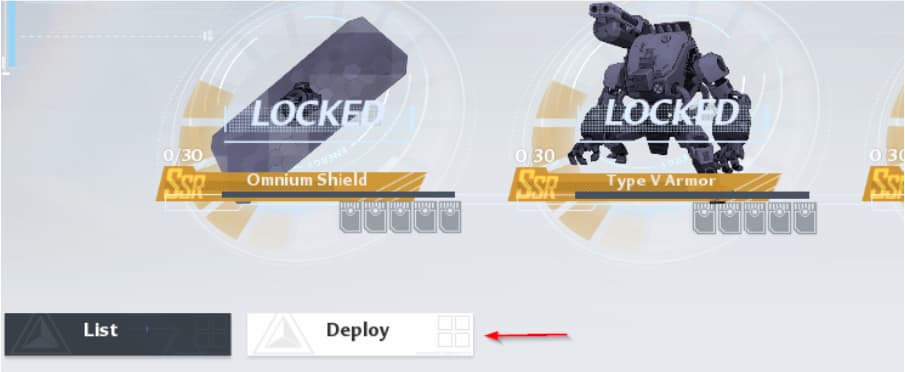
- Step 2: Now, hit the More button to create a new set of relic presets.

Here you can arrange the set as you like and with the relics you have. Once you’re done with the settings, go back to the game. If your setup is successful, you will see a small arrow to the left of the relics.

- Step 3: Now, if the little arrow appears, it means that the configuration was successful. Now, pressing “G” will cause an exchange of relics set.
And this is how you can quickly change relics without doing it manually. Hope you enjoyed our guide. For more information related to Tower of Fantasy, check out our guide on how to increase Combat scores And the trick of infinite resistance.
Did you find our guide on how to quickly change relics in Tower of Fantasy useful? Let us know in the comments below!


Start a new Thread