
Samsung has released a new version of the Expert RAW camera app and comes first on the Galaxy S22 series. The company is also launching a brand new app, aptly named Camera Assistant, which gives you manual control over some of the camera’s automatic functions.
Some are basic things like disabling the video recording option in photo mode (this often happens accidentally if you hold down the shutter button for too long). You can also set how many photos to capture when using the timer function: 1, 3, 5 or 7.
Some are simple but have a big impact on the final image. Camera Assistant allows you, for example, to disable automatic HDR. You can also turn on Soften Images, if you feel the camera app applies too much sharpening.
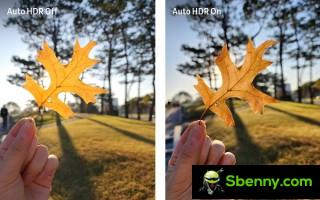
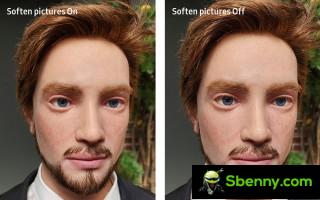
Samsung’s new camera assistant lets you disable Auto HDR and activate a Soften Image mode
There’s more: Faster Shutter does what the name suggests, speeds up the shutter speed so you can take 7 photos in one second.
Another option lets you disable automatic lens shifting, which is to say it gives you manual control over which lens to use. Typically, you set the zoom and the phone decides which camera will work best for which zoom in certain lighting conditions (for example, it can use the main camera instead of the telephoto lens). With the assistant, you decide.
Finally, two features that won’t be very useful for casual users but may be invaluable for professionals. You can enable clean preview for HDMI displays (i.e. the phone will only output the camera feed without the overlay UI) and you can set the camera timeout (to 1, 2, 5 or 10 minutes before the camera goes to to sleep).
Well, it’s time to talk about the new Expert RAW version. It now features Astrophoto mode for photographing the night sky, constellations and nebulae. This mode will capture images for several minutes and uses multi-frame processing that takes into account the movements of celestial objects. This app also draws constellations and other celestial objects of interest, so you can take a picture of the Big Dipper even if you don’t know where it is in the night sky.
The other new mode is called Multiple Exposure. This allows you to take several photos and combine them with different overlay modes. This is a creative technique that harks back to the old days of movies to create interesting images, but the digital version offers more precise control over the final product.
Go to Samsung’s press release for instructions on how to download and launch the Camera Assistant app.


Start a new Thread