
introduction
This is the new Huawei MateBook 16S, a laptop that matches the overall design of last year’s MateBook 16, but a noticeable change in the interior from Intel’s Alder Lake. If you’re not familiar with Huawei’s MateBook 16, it has a 16-inch display with a higher 3: 2 aspect ratio, packed into a slim body that weighs just under 2kg.
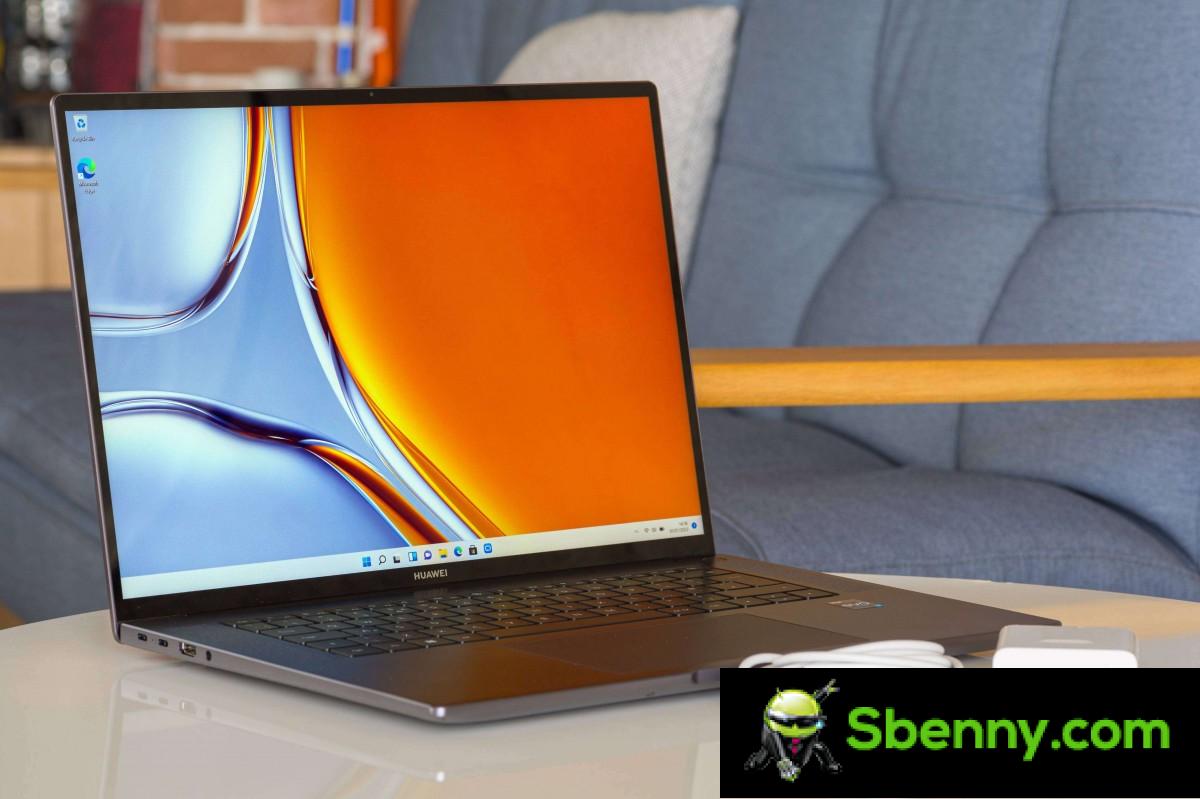
And if you are not familiar with the aspect ratio of the display, we will define it for you in a simple and intuitive way. A conventional laptop screen is 16: 9, perfect for large videos, while a 3: 2 display is only slightly narrower, but has a lot more vertical space. It makes it much more suitable for viewing web pages and photos (they are usually 4: 3 or 3: 2). The squarer look is also more convenient for videos editingwhere you need to fit the actual video and a number of UI elements below it.

Huawei has reused the MateBook 16’s chassis, ports and everything in between, but has opted for Intel’s 12th Gen Alder Lake H series chips, instead of last year’s AMD Ryzen 7 series processors. This year’s choice is between the 12-core i5-12500H (4 high-performance cores and 8 efficient cores) and the 14-core i7-12700H and i9-12900H (both with 6 high-performance and 8 efficient cores).
These are all 45W processors meant for high performance laptops, but with this year’s big change in Intel architecture (the big.LITTLE architecture), we can expect a much better performance / battery life ratio. We will talk about it later. Additionally, one USB-C port is Thunderbolt 4 and there’s Wi-Fi 6e support.
The display is for the most part the same as last year. It’s still a 16-inch 2560x1680px IPS LCD with 300 nits of brightness and a 1500: 1 contrast ratio. The big change this year is that the display is touch sensitive, which can come in handy on some occasions, but we would happily have swapped that feature for higher brightness.

The Huawei MateBook 16S has the same 84 Wh battery as its predecessor, with a choice between the monstrous 135W charger or the more reasonable 90W brick, depending on which CPU you get.
The laptop also offers an improved 1080p camera with the ability to follow you in the frame and show a custom virtual background. The speaker setup is the same, as are the keyboard, touchpad, and even the cooling underneath.
Design, display, ports, keyboard and touchpad
For most intentions and purposes, the MateBook 16S is identical to the MateBook 16. It has the same dimensions and the same weight of 1.99 kg. The display has the same diagonal and bezels, which are thin, in a vacuum, but a bit wider than those offered by some modern 16-inch laptops.
We have the Space Gray model and all the others too, because it is the only color available. We imagine 16-inch laptops should be drab and utilitarian. On a positive note, the case is made of metal.

You can open the laptop with your finger. You’re greeted by a full-sized backlit keyboard with no numeric keypad (nor any kind of special key row) and a generously sized glass touchpad. The touchpad surface is very pleasant to the touch and the multi-touch gestures are easy to perform.

The keyboard is very good. The keys have a very good 1.5mm travel and are soft, but not mushy when typing. They’re also well spaced, as you’d expect from a keypad-less keyboard on a 16-inch laptop chassis. There are two levels of backlighting. The speaker grilles frame the keyboard on both sides. These are excellent speakers – they get very loud and hold a good amount of bass.
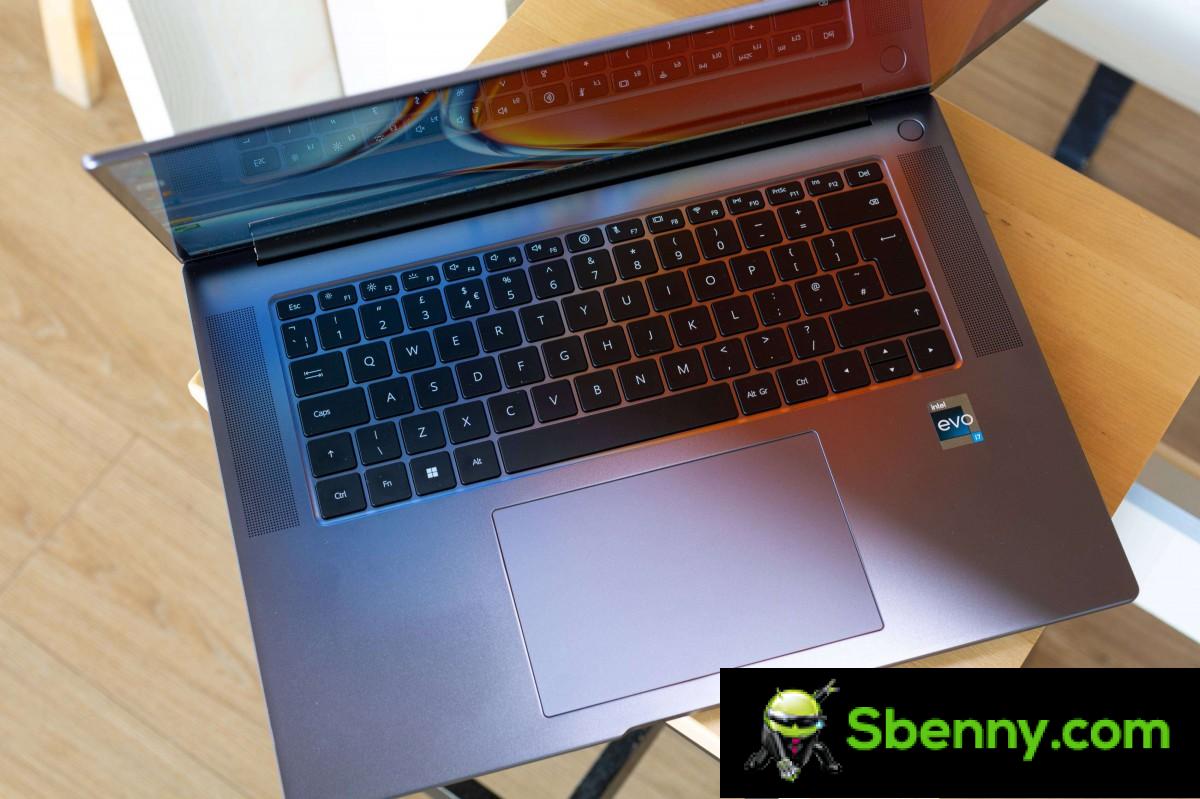
The palm rests on either side of the touchpad are large enough to hold your hands while typing. The touchpad itself has good palm rejection and we had no problems typing on this device.
We have mixed feelings about the display. On the one hand, it is very sharp thanks to its high resolution and the resulting 189ppi density. Viewing angles are good as the display does not lose contrast when viewed at an angle. However, the glossy panel is extremely reflective. You can see pretty much everything around it, reflected on the glass, and the effect is even more pronounced at an angle.

Pair that with the only average brightness of the display and you have a screen that is only good in dimly lit environments.
Huawei advertises the panel as 300 nits. We measured 320 nits in the center of the display and around 280 nits in the corners. Not perfect uniformity, but it’s not bad either. We would have liked a brighter panel this year as 300 nits are getting pretty underwhelming, especially at this price point.
Also, the display is only 60Hz, we would have liked to see a 90Hz panel like on some of the other Huawei laptops.

Despite the low brightness, the display is very contrasted and the colors are very deep and saturated. Huawei claims an average Delta E of less than 1, but we measured it at 2.5, which isn’t ready for content creation. Our unit’s display had a noticeable blue cast. You can calibrate the panel to match 100% sRGB.
The display bezels are a bit wider than what you’d get on Asus’ 16-inch MacBook Pro or 16-inch MacBook Pro. But you wouldn’t notice unless you compare them directly. Huawei has improved the top-mounted camera this year. It’s 1080p and supports FollowCam, which keeps you in the center as you move, plus a virtual background and even a feature that will try to make it look like you’re looking at the camera when you’re not (we were unable to get it to work, though).

The camera isn’t certified for Windows Hello, but there’s a fingerprint reader underneath the power button, which also supports caching, so it’ll turn on your computer and log in with a single press.
The MateBook 16S performs well when it comes to ports. On the left, there are four – a 3.5mm audio jack, a full-size HDMI 2.0, and two USB-C (3.2 Gen 1) ports – both support charging and display output, but only one Thunderbolt 4 at 40 Gbps (the bottom one with the lightning bolt arrow). There are two USB-A (3.2 Gen 1) ports on the right side. The only thing missing is an SD card reader.


Doors on both sides
Opening the Huawei MateBook 16S is an easy task – just unscrew five T5 Torx screws and you’re inside. There isn’t much to do inside though – there’s no second SSD slot, and the Intel AX211 Wi-Fi 6E wireless card is now soldered to the motherboard.
Performance and battery life
Huawei switched to Intel silicon with the MateBook 16S, and you can choose between the 12th generation Intel Core i9-12900H, Intel Core i7-12700H, and Intel Core i5-12500H processors. They are all 45W, but as we have already mentioned, the Core i5 has 4 performance cores and 8 efficiency cores, while the Core i7 and Core i9 have 6 performance cores.
We would say the i7-12700H is the best choice. It’s noticeably faster than the i5, yet virtually identical to the i9 in this type of laptop. The i9 offers a higher clock speed of around 300MHz, which isn’t something you’ll notice on a machine that’s not meant for gaming.
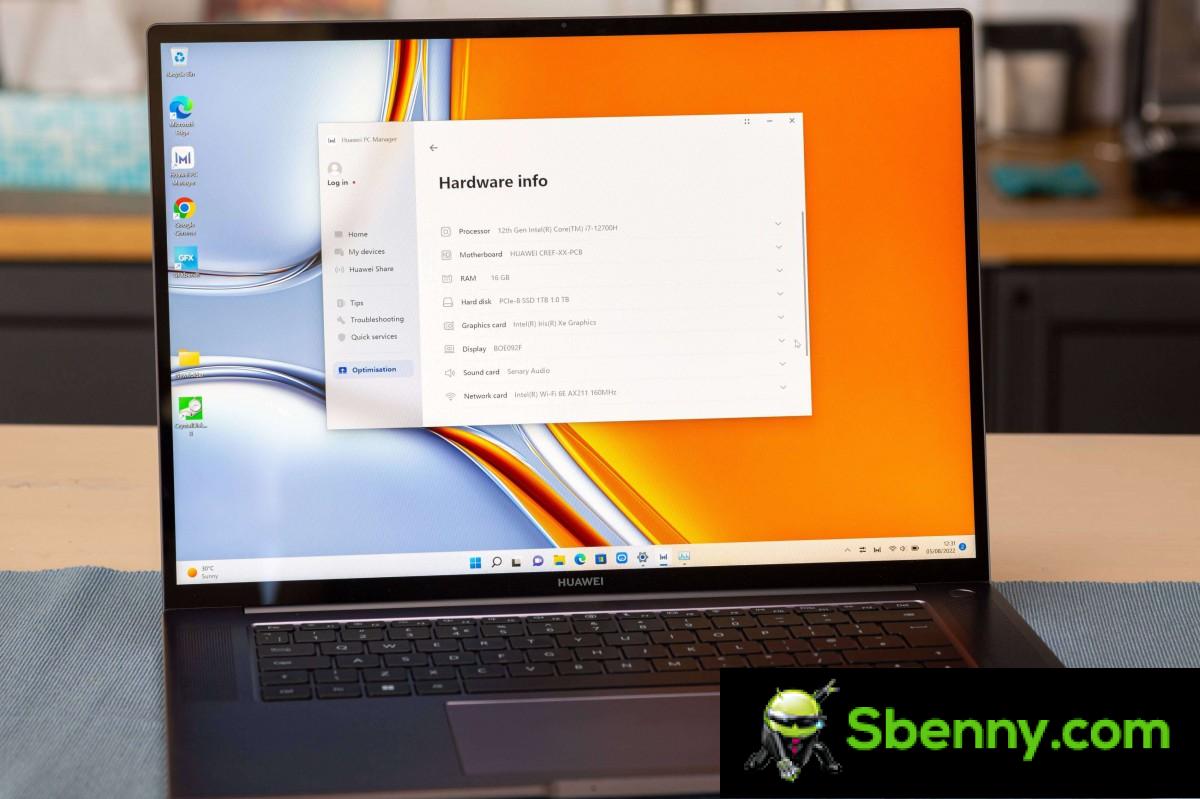
Continuing that thread, the MateBook 16S lacks a discrete GPU and is based on Intel’s integrated Iris Xe graphics. It’s perfectly fine for office work and entry-level to midrange gaming at settings below 1080p, but you won’t be able to enjoy triple-A titles on the MateBook 16S.
The Core i7-12700H we have in our review unit performed well for photo editing (after doing a screen calibration) and even some 4K video editing after a few proxies.
Switching to Intel 12th generation processors would benefit performance in gaming and authoring applications, as Intel currently has an edge over AMD. But that’s no good without a decent GPU to match the capable processor. In this case, you’re not really enjoying the performance benefits, while at the same time getting a less efficient chip than last year, potentially damaging battery life.
The Matebook 16S has extensive integration with other devices in the Huawei ecosystem – Huawei calls it Super Device. The laptop comes with Huawei PC Manager, which is a way to enjoy Huawei Share. The software pairs a Matepad tablet to use as a secondary screen – you can mirror the laptop, extend the display, or even transfer files via drag and drop gestures.
It works the other way too: you can use the Huawei M Pencil on the Matepad and turn it into a graphics tablet or use it to run any software, of course, with the apparent miniscule lag due to wireless connectivity.
Huawei Share also works with eligible phones – owners can manage their phones via the laptop – they can answer calls (especially useful if you’ve prepared some Freebuds), share screens, or drag and drop pictures and other files. All of this officially only supports devices officially on HarmonyOS 2.0 and not necessarily all of them.
Let’s take a look at the performance. The 1TB SSD recorded impressive numbers, but it’s a PCIe 3.0 drive and the MateBook 16S motherboard probably supports PCIe 4.0 given the 12th Gen Intel processor, so you might want to consider a PCIe 4.0 SSD for some extra performance.

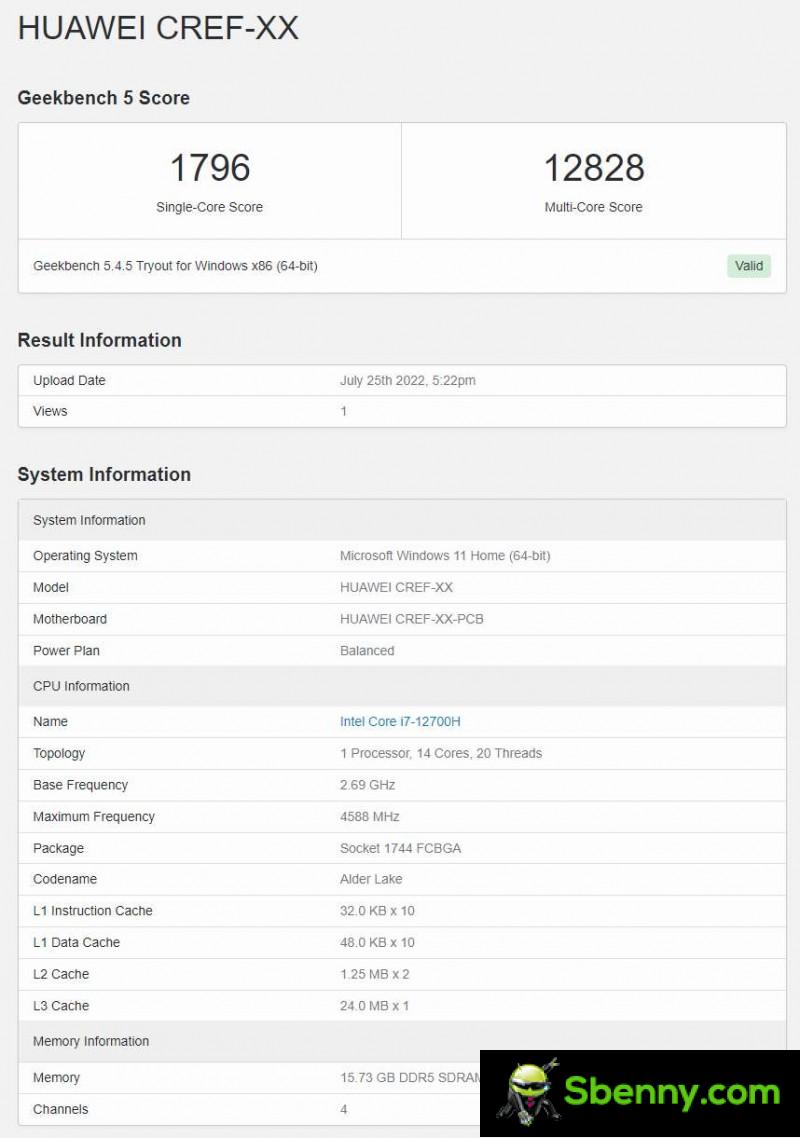
At this point, Intel’s 12th Gen processors have been tested everywhere by nearly every reputable PC reviewer, so we won’t take a deep dive. Suffice it to say that the Core i7-12700H is one of the best on the market right now.
In Geekbench, the Core i7-12700H scored 20% better than the Ryzen 5800H in last year’s MateBook 16 in single core and 54% better in multi-core. The latter would greatly benefit apps like Photoshop, Premiere or DaVinci Resolve.
Cinebench R23 once again emphasizes the speed of the latest Intel processors, approaching the top of the ranking for single core and surpassing it in multi core. We tried running GFXBench, but the app kept crashing in every test we tried.


Banco Cine R23
In terms of thermal management, we’ve seen the same tuning from Huawei as the other MateBook laptops, regardless of the processor series used. Huawei likes a quiet, cool laptop and has optimized the MateBook 16S to be one.
The processor is set to a base clock of 2.3 GHz, but normally maintains around 1.4 GHz. When we ran a CPU burner test, the cores increased to 3.2 GHz for a few seconds, then gradually they dropped to around 1.3 GHz. This means that the laptop will almost never turn on its dual fans and they are mostly inaudible. Even during our stress test in a room at around 24 ° C, the fans were very quiet.
As a result, the laptop also did not heat up excessively. Most people will appreciate the quiet and cool operation, but it means the powerful Intel Core i7-12700H processor is seriously underused. It would make more sense to insert a lower series chip if it were optimized to run cool and quiet.
The latest Intel processors still fall short of their AMD rivals in terms of efficiency. The 10mm architecture isn’t as efficient as the 7nm Ryzen 5000 series or the new 6nm Ryzen 7 was.

We ran a battery test, which runs a looping YouTube video at maximum brightness and volume until the laptop shuts down. It gives you an idea of the longest time you can expect the laptop to run with everything to the max. It logged just over 6 hours, which isn’t bad but it doesn’t match last year’s model, which logged over 7 hours.

A 30-minute charge with the 90W brick returned 37% from 0%. A full charge took about an hour and a half.
Wrap
Huawei MateBook 16S is a great laptop. It is built well with quality materials and is an excellent performer. Battery life is good, if not really impressive, and the same can be said for the display.
The fact is that the MateBook 16S is not substantially better than its predecessor, but it is much more expensive. The MateBook 16S costs € 1,700 / £ 1,300 for the Core i7-12700H model, in contrast to the € 900 / £ 800 you would pay for the MateBook 16 – these are all official Huawei prices. Last year’s AMD Ryzen 7 processor is still great and is easier on battery than Intel’s Alder Lake chips.

The problem is further complicated by Huawei’s MateBook D16, which costs € 1,300 / £ 1,000 with the same i7-12700H processor and fairly close specs, including a 16-inch 1920x1200px IPS LCD – not a 3: 2 panel, but a 16 : 10, it’s even higher than your typical 16: 9.
Which means we can’t really recommend the Huawei MateBook 16S at its current price at the moment. You may find a laptop with a brighter display and similar performance for less money and a much better display and equal performance for a little more money. We would go with Huawei’s MateBook 16 compared to the 16S as it is pretty much as good and is priced much better.
Professionals
- Large, sharp display with a good front viewing experience
- The 3: 2 aspect allows for better usability
- Powerful 12th Generation Intel processors
- Excellent port selection – Thunderbolt 4 is nice
- The keyboard and touchpad are both of high quality
- Good, loud speakers
versus
- Expensive, especially compared to the predecessor
- Only 300 nits of brightness
- Little practical effect of switching to Intel Alder Lake
- Very reflective display


Start a new Thread