
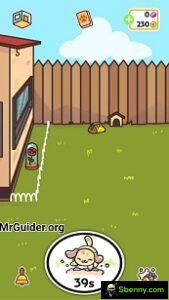
 KleptoDogs is a brand new fun casual game for Android and iOS by HyperBeard. Check out our KleptoDogs guide to mastering the game; dogs, places and more
From the creators of the KleptoCats game series, KleptoDogs was created especially for dog lovers and challenges the player to collect all the dogs and find all the secret objects. The KleptoDogs game features 30 dogs, 101 secret items and three locations. All you have to do is send the dog on an adventure to collect the items. And in this post, we have covered everything you need to know about the game:- KleptoDogs Guide: Dogs, Coins, Gems, How to unlock dogs, switch dogs, codes, minigames and much more.
Basics Guide – How to Play – KleptoDogs Game⇓
If you haven’t played other Klepto series games like KleptoCats, KleptoCats 2, you may find it difficult to understand the mechanics of the game. In this basic KleptoDogs guide, we have covered all aspects of the game.
In KleptoDogs, your main task is to send the dogs on an adventure. You can send one dog at a time and the dog will come back after a certain amount of time with coins and items. On the home screen, tap the dog and tap the “Exit” button.
Your goal is to complete the dog list (30 dogs at the moment). And discover all the missing items and complete the collection. As you progress, your dog will take too long to explore.
However, you can speed up the process by spending coins. KleptoDogs also features three locations (one will be available soon). At the start of the game, the courtyard is unlocked. So, this is the basic guide for beginners. Now let’s learn more about the game.
Guide for dogs⇓
As of now, KleptoDogs game features over 30 dogs and to unlock new dogs, you need gems. Read the gem guide below for more info.
How to get a new dog;
- From the main screen, tap the paw icon at the top.
- After it, a small menu will appear
- Find the option named “new dog”
- Tap it to get a new dog (make sure you have enough gems)
How to move to a new dog or change dogs?
If you have multiple dogs and want to switch to another one to send him on an adventure then follow these steps:-
- On the home screen, tap the dog
- A small menu will appear
- At the top of the menu, tap the dog’s name
- Another small menu will appear
- Use the navigation keys to switch to a dog
- Tap the choose me/paw icon to select him as the primary dog
How to change a dog’s name?
- Tap the paw icon (top of the game main screen)
- Select Dog-alog
- Touch the dog
- Tap the pencil icon next to the dog’s name
Coin farming tips in KleptoDogs⇓
Coins are used to get gems, buy clothes, use the bell feature (lets you call the dog instantly from an adventure/round).
How to get coins?
- Run the dogs
- Watch video ads
- Daily reward
- Play minigames
- Share the selfie
Also, see – The best arcade games for Android
Tips for growing gems ⇓
The gems are used to unlock the new location, get a new dog and in the boutique to buy an outfit for the dog. There are different ways to get gems in KleptoDogs game: –
- Exchange coins for gems (in the lower right corner, tap the + icon next to the game currency. There you will see the exchange option)
- Complete sponsor offers (go to shop -> free gems)
- Tap the “Like” option and “Follow us”.
- Enter the code (if you have it)[menu -> settings -> locker/safe -> enter the code]
Location guide⇓
As of right now, it features two locations; courtyard, kitchen. New locations are coming soon (source; game). How to move to a new location?
- In the upper left corner, tap the house icon
- A new small menu will appear
- Tap the dropdown menu and choose the location
Guide to the boutique⇓
At the boutique it is possible to buy the clothes for the dogs in exchange for coins and gems. How to get? On the home screen, tap the dog -> outfit -> accessories, glasses, outfits and more.
Minigames⇓
KleptoDogs also features arcade minigames. You can earn coins and other items (banana peel, a piece of meat, dog treat (6 quarters of these items = 1 coin)) by playing these mini-games.
To play the mini-game, tap the dog on the main screen -> play -> select a game. That’s all. To go back, tap the exit icon in the upper left corner.
So this is the KleptoDogs Guide for starters. We will share KleptoDogs tips, tricks and strategy guide soon. Download – Here (Google Play Store). Also, see – The best cat games for Android
Share this content




Start a new Thread