
Check out this guide and learn how to reset Dragon Ball Legends, how to restore old save data, and how to use the data transfer feature to earn 500 free crystals
So, you have decided to restore your Dragon Ball Legends game progress or you don’t know how to save or restore your old saved progress. In this post, we have covered everything in detail; like reset, transfer data, start a new game from the beginning. Let’s start without wasting time.
Data transfer function
In Dragon Ball Legends, you can link the game to your Facebook or Twitter account to save your game progress. Linking the game to these social media accounts rewards you with 500 free crystals. And you can pick up where you left off at any time on any device.
As of right now, there is no Google Play Games service, so you need a Facebook or Twitter account to save game progress to the cloud. Here is how to do it:-
Step 1.) Open the game. Tap the menu. Find the “more” option and tap it.
Step 2.) In other settings, tap on the “Data transfer settings” option.
Step 3.) Now choose a method; if you want to connect the game to Facebook, tap the Facebook account. Then a new Facebook login pop-up window will open, enter your Facebook username or phone number or email and password. Then choose to continue.
If you want to link the DB legends to your Twitter account, tap on the “Twitter Account” option. Enter your Twitter username and password and authorize the game on your Twitter account.
You can choose anyone. After connecting it to one of these social media accounts, go back to the menu -> tap on the mission option -> go to mission Z and claim 500 free crystals.
Reset Dragon Ball Legends and start a new game
Since it doesn’t use Google Play Games as a cloud data saving option, you can easily restore the game and start over. That’s how: –
Go to your mobile settings -> apps -> Dragon Ball Legends -> clear data.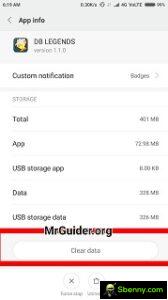
After that, open the game again. Choose the language. After that, you will be prompted to start a new game or transfer old data. Choose to start a new game. And this is all.
Also see – DB Legends Guide, Tips, Cheats & Strategy
Restore old saved progress – Dragon Ball Legends
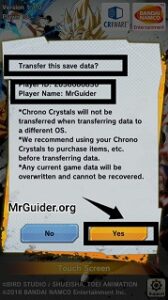 If your game is connected to your Facebook account or Twitter account, you can easily reset your game progress. Here’s how ->
Case 1.) When you start the game, you will be prompted to “start a new game” or “transfer” your old game progress. Choose transfer -> sign in with your Facebook or Twitter account. That’s all. 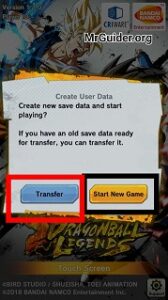
Case 2.) If you are playing as a guest; go to menu -> more settings -> data transfer settings -> connect the game again to your facebook or twitter account (which was used by you before).
Also see – DB Legends Guide – How to use ramping rush and main skill in battle
Reset Dragon Ball Legends and start over with the same social media account
For example; I have only one social media account and I want to use it to save game progress. But it’s linked to the game and I want to reset it and start a new game and then I want to use it again to save the game progress.
For that, you need to go to Facebook or Twitter Settings -> choose apps -> search for Dragon Ball Legends -> remove or de-authorize it from Facebook and Twitter account respectively.
Once done, clear the game data. Open the game, choose “start a new game”. Go to menu -> more settings -> link the game to your account and it will not reload your past progress and you can play DB Legends from the beginning.
Keep in mind that; If you are transferring data to a different operating system[i.e. From Android to iOS]you will lose your crystals.
Also see – Best Dragon Ball Z Games for Android
So, this is the short guide for Dragon Ball Legends players who don’t know how to save progress, restore old progress, how to start a new game. You can ask more questions here.
For more updates, game news, game guides, new game releases and NOTICES – Like us on Facebook – MrGuider, follow us on Twitter – @techhunter. Check it out – The best new Android games today. Sign up, give your suggestions – here.


Start a new Thread