
The OnePlus Buds Pro 3 are the company’s latest pair of true wireless earbuds and the sequel to 2023’s OnePlus Buds Pro 2. The new model comes with all the mod cons, including dual drivers, a Dynaudio-tuned dual-DAC design, adaptive noise cancellation, pinch gestures, a leatherette design, and spatial audio. They can even track your neck position, so you can finally stop slouching.
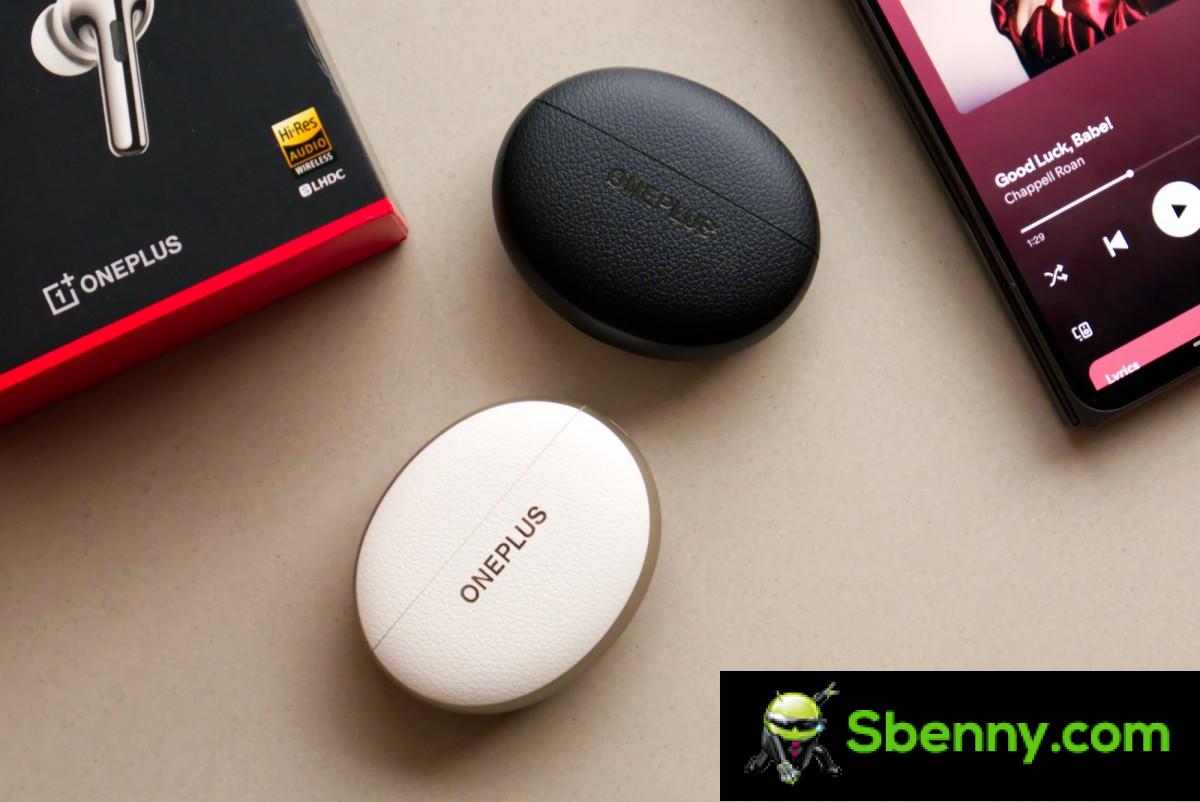
Today we’ll be reviewing OnePlus’ new flagship audio product and seeing how it stacks up in this competitive market.
Design and comfort
The OnePlus Buds Pro 3 moves from the horizontal case design of the previous two models to a vertical layout. This generation’s cases have a two-tone design, with a leather texture on the front and back and a metallic finish on the sides.

The exterior finish is neither genuine leather nor vegan leather, but just hard plastic textured to look like leather. As such, it just feels like leather, but the moment you hold the case in your hand, it is immediately obvious that it is just plastic.
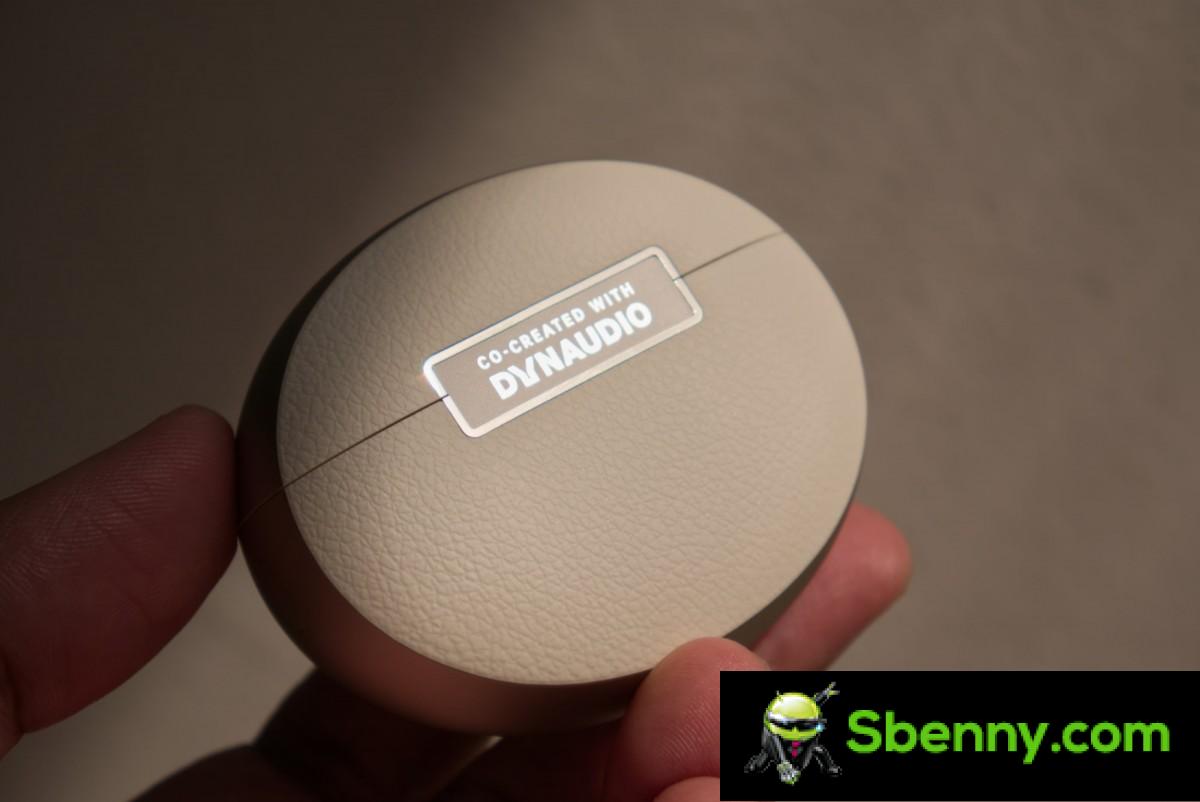
The front and back of the case feature the OnePlus and Dynaudio logos respectively. At the bottom is the charging port with an LED that indicates the charging status. On the right side is the pairing button.
Open the lid and you are greeted by the two earbuds and another LED for pairing status. The hinge on the lid is very well made, with absolutely no lateral movement.

The earbuds are beautifully designed with perfectly polished cylindrical stems. The glossy plastic transitions into a matte finish ring with Dynaudio branding, just before it transitions into the inner plastic. The inner plastic pieces have L and R logos etched into them, which function as vents, just like on the Nord Buds 3 Pro.
The earbud stems are pressure-sensitive and support gestures. You can squeeze the stems once, twice, or three times for different gestures. There’s also a volume-up gesture, which works by grabbing the stem like you would for a squeeze gesture, but then sliding your index finger up and down instead of squeezing.
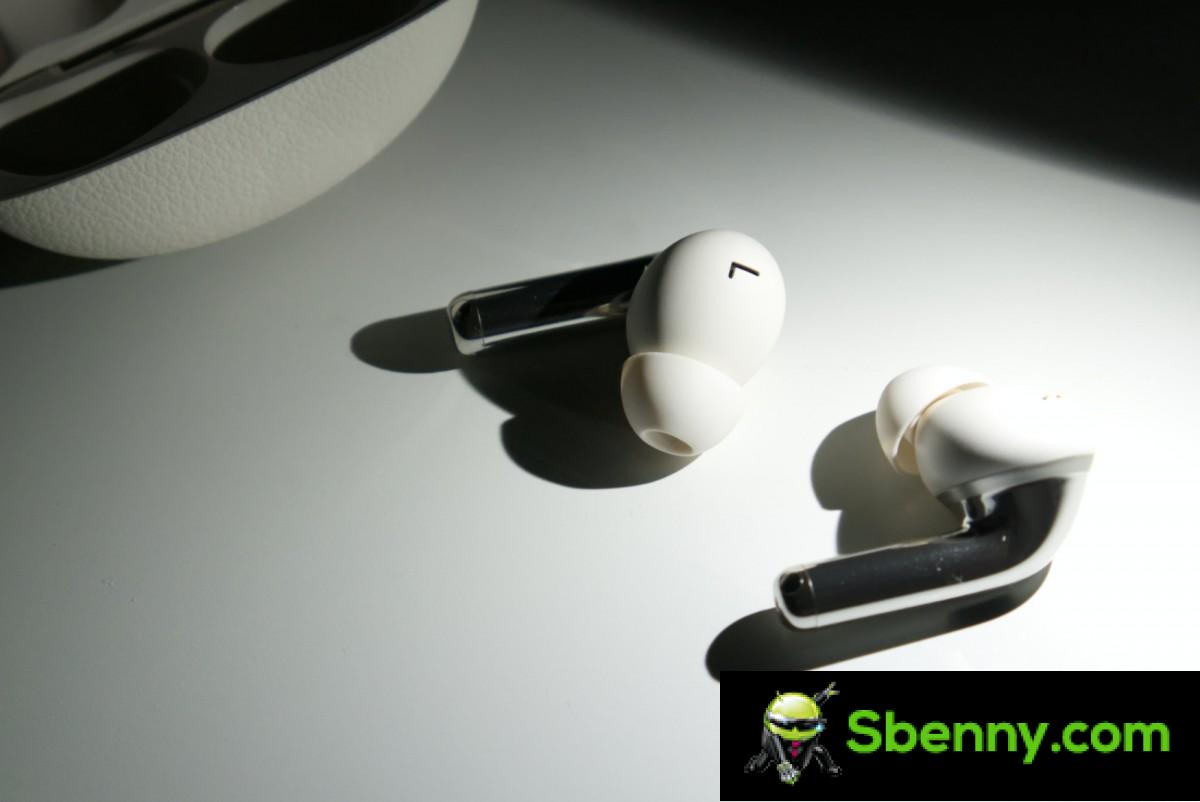
Overall, despite the slightly plasticky feel of the faux leather on the outside, the case and earbuds are well designed and have good build quality. The earbuds are also IP55 rated, so that’s a bonus.
In terms of comfort, the Buds Pro 3 are decent. The plastic shell is a little thick, so while it didn’t hurt or bother my ears, I could always feel them and remember I was wearing them. I found that the default ear tips, while flexible, slipped out of my ears a bit too easily. The left one would periodically loosen on its own and need to be readjusted.
Software and features
The OnePlus Buds Pro 3 are compatible with the HeyMelody app for Android and iOS. On OnePlus devices, the earbuds can be controlled via Bluetooth settings. Either way, you get the same options.

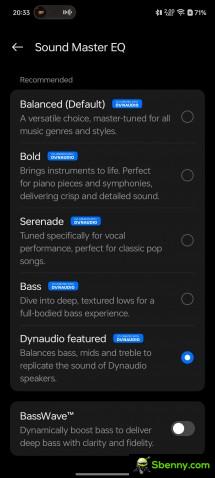
The app features the usual array of settings: you can adjust the ANC, which in this case includes three levels of attenuation along with an automatic Smart mode, EQ, a Hi-Res mode switch (enables sampling rates above 48kHz for LHDC), Golden Sound (customizes the tuning to your hearing), and Spatial Audio, which also includes head tracking via built-in motion sensors.
The app also lets you customize the earbud controls. You can customize single, double, and triple squeeze gestures, along with the swipe gesture. As with other models, I found the squeeze gestures to be generally superior as they are difficult to accidentally activate when putting the earbuds on or off.


ANC and EQ
The OnePlus Buds Pro 3 also comes with the Neck Health feature, which was later added for the Buds Pro 2. It uses built-in sensors to detect your neck position, and using the OHealth app provides reminders to correct your posture.
The earbuds also have multi-device pairing and you can manage all the paired devices through the app. The feature is disabled by default, so you will need the app to enable it.


Gestures • Golden sound • Spatial audio
On the HeyMelody app, you can enable a Game mode to reduce latency. On OnePlus devices, the paired device will automatically activate Game mode when it detects a game launching.
Finally, you can also update the firmware via the app. This should make the device better, but as you will soon see, it can also make it worse.
Performance
Audio quality
The OnePlus Buds Pro 3 feature a dual-driver design, including an 11mm woofer and a 6mm tweeter. Each driver also has its own dedicated DAC for reduced crosstalk, interference, and improved power management.
The earbuds support SBC, AAC, and LHDC 5.0. There’s no LDAC, which means for most Android devices, you’ll be downgraded to AAC since LHDC is still pretty rare. There’s also no Bluetooth LE or LC3 audio support.
OnePlus says the Buds Pro 3 are tuned by Dynaudio. All of the EQ presets in the app have a Dynaudio label next to them, though four out of five presets are identical to those you’ll find on almost every other OnePlus audio product. It’s only the “Dynaudio featured” preset that stands out, as its description reads, “Balances lows, mids, and highs to replicate the sound of Dynaudio speakers.” Sounds promising, right?
When I first got the earbuds and switched to this preset, it was like catching lightning in a bottle. Here was a consumer product aimed at the average user with exceptional, audiophile-grade tuning for at least one of its presets. It didn’t matter if the sound matched the Dynaudio speakers or, indeed, if it was even tuned by Dynaudio. It was good, period.
Apparently, it was too good, or maybe not good at all, depending on which focus group OnePlus consulted, because a week later, an update arrived that absolutely blew that Dynaudio preset apart. Gone were the beautifully balanced lows and mids with bright, sparkling highs, replaced by what now sounds like your car audio while you’re outside the car. The lows have been boosted and married to a muddy, dirty midrange that makes the entire bottom half of the frequency spectrum sound bloated. They’ve also gotten rid of all the high-frequency energy, so now it just sounds like a 96kbps MP3 recording of an AM radio broadcast.
I’d like to think this was a mistake, but OnePlus doesn’t have a great track record when it comes to these things. Even the so-called Hans Zimmer Soundscape Tuning preset on the Buds Pro 2 was complete garbage, and would have had Zimmer curling up in a fetal position if he’d ever heard it.
The original Dynaudio preset featured on the Buds Pro 3 was a breakout moment for these earbuds, but with that out of the way, we have to fall back on the remaining presets. The so-called Balanced (Default) preset is, in true OnePlus fashion, anything but balanced. It’s a classic V-tuning, with the bass and treble boosted and the mids suppressed. I don’t mind this preset too much because the bass boost is largely tasteful and the sparkling highs are pretty much where you’d expect them to be. It’s just that the mids are a little too suppressed, which pushes vocals much further to the back of the mix and often makes you want to crank up the volume to compensate.
At first I struggled to figure out how the Bold preset differs from Balanced, since they sound very similar. From what I can tell, Bold has a little less brightness in the low-mids and highs, making it a less V-shaped version of Balanced and thus more balanced overall, ironically.
Serenade significantly lowers the bass and treble compared to Balanced, while also boosting the mids. This is definitely a mid-forward tuning and works for some genres and content, but it overdoes the mids a bit and can sound a bit shrill.
The Bass preset sounds like Balanced with more bass. Not much else to say.

OnePlus also gives you a six-band EQ to further customize the sound. As usual for OnePlus, the default value of 0 for the custom EQ is the Balanced preset, and not a true 0, so you’re essentially adjusting the Balanced preset. You can’t make any changes to any of the other presets.
Finally, there’s the BassWave feature, which provides a knob to raise and lower the bass. I’m not sure why this needs to exist when you have a custom EQ, other than you can activate it on top of other presets rather than replacing them.
Despite the crime of nerfing the featured Dynaudio preset, the Buds Pro 3’s sound saving grace is that it’s very detailed. The driver combo sounds quite good, and while you don’t get wired levels of detail here, I was still quite impressed with what I was hearing. These are easily some of the most detailed true wireless earbuds on the market today. The drivers also have decent imaging performance with a decent soundstage.
Microphone
The OnePlus Buds Pro 3 have decent microphone performance. The audio is clear but the voice sounds a bit robotic. There is also a small amount of artifacts in the voice, which makes it sound a bit crispfor lack of a better term.
However, the earbuds do a good job of masking background noise, even when it gets loud or windy. Your voice remains intelligible in these conditions, too. So while it’s not the best overall, it’s a decent setup for calls.
Noise cancellation
The OnePlus Buds Pro 3 feature adaptive noise cancellation, which means they adapt the level of noise isolation to your surroundings, even if you manually set it to the maximum level.
Noise cancellation on OnePlus earbuds has been great for a while now, and the Buds Pro 3 are no exception. You get some truly flagship-level noise cancellation here that works really well in almost any environment. It even copes well with windy conditions, lowering the ANC level to eliminate buffeting. I’m also particularly pleased with the way it cancels out ambient voices, which is something they’ve focused on with this model. If there’s anything they could improve on, it’s reducing the sound of keyboard clicks, as they tend to get through probably more than they should.

The transparency mode also works well, although there is room for improvement. The sound is very natural, but it seems to focus more on the ambient noise patterns rather than, say, someone talking to you. I think the transparency system should do the opposite of ANC and give more priority to voices, especially for those in your immediate vicinity.
Latency
The OnePlus Buds Pro 3 have excellent latency performance. Typically, wireless earbuds tend to rely on game mode to reduce lag, but the Buds Pro 3 work incredibly well out of the box, even with a desktop PC, which doesn’t even have a companion app, let alone game mode. Game mode makes everything even better, making them perfectly suited for casual gaming.
Connectivity
The OnePlus Buds Pro 3 had good connectivity performance during testing. Even when using the 900 kbps LHDC codec, the connection was stable while walking around the room, something you absolutely can’t take for granted with earbuds, because it’s not at all common.
The dual connection feature also worked well and it was pretty easy to pair the earbuds to, say, a PC and a phone. Once paired, you can change the settings on the earbuds via the phone app even if it’s playing audio from the PC.
Battery life
The OnePlus Buds Pro 3 have a claimed battery life of 6 hours with AAC and 5 hours with LHDC while playing music. With ANC disabled, OnePlus claims 10 hours for AAC with no claim for LHDC.
While ANC numbers are the most relevant, it’s not easy to test battery life with ANC turned on, as it requires skin contact (preferably your ears) to activate. It’s also difficult to test with adaptive ANC, as it requires constant background noise so that it doesn’t change levels during testing. This means that the test was only conducted with ANC turned off.

In this mode, I managed to get 8 hours and 47 minutes of use from the earbuds after continuous audio playback using the LHDC codec. With AAC, you can probably expect an hour more, bringing you closer to the claimed 10-hour mark. OnePlus’ claims are generally reliable, so this is not surprising.
All things considered, the claimed 5 hours with ANC and LHDC is good, but also a bit insignificant.
Conclusion
The OnePlus Buds Pro 3 are priced at $180 but can be had for $150. As usual, OnePlus is undercutting the bigger brands while offering more or less the same bells and whistles.
Aside from the audio quality, the Buds Pro 3 are a very well-made product. They have a good design and build quality, comfort, all the features you would want, excellent noise cancellation, good microphone quality, great latency performance, and decent battery life. Basically, you have all the ingredients for a winner, especially for the price.

But then we get to the audio quality. While the default tuning is harmless, it’s hard to overstate how much nerfing Dynaudio’s featured preset negatively impacted the overall audio rating. Someone in the company shipped a nearly perfectly tuned preset, and then someone much worse at their job took over and decided to ruin it. You rarely get to see this level of self-ownership, and yet here it is. Unless OnePlus reverses this change, most people outside of early reviewers will never get to experience the original tuning, which saddens me.
Now I have two units in front of me, one of which is still on the original firmware that I will never update. The other one has been updated and is what people will actually buy. The first one is the one I will use in the future. The other one is back in its box.
Professionals
- Good design and build quality
- Convenient compression gestures
- Feature rich app with good customization
- Good microphone performance
- Excellent noise cancellation and transparency
- Excellent latency performance
Against
- Exceptional audio quality ruined by a software update
- No LDAC; LHDC is still a rarity on phones



Start a new Thread