
 Trusted by over 1.6 million members since 2014 — why not join them?
Snailsoft
∞ and beyond!
Staff Member
Moderator
SB Mod Squad ⭐
✔ Approved Releaser
Active User
Member for 2 years
- Gender
- Not specified
- Device
- 6502
- Country
- Canada
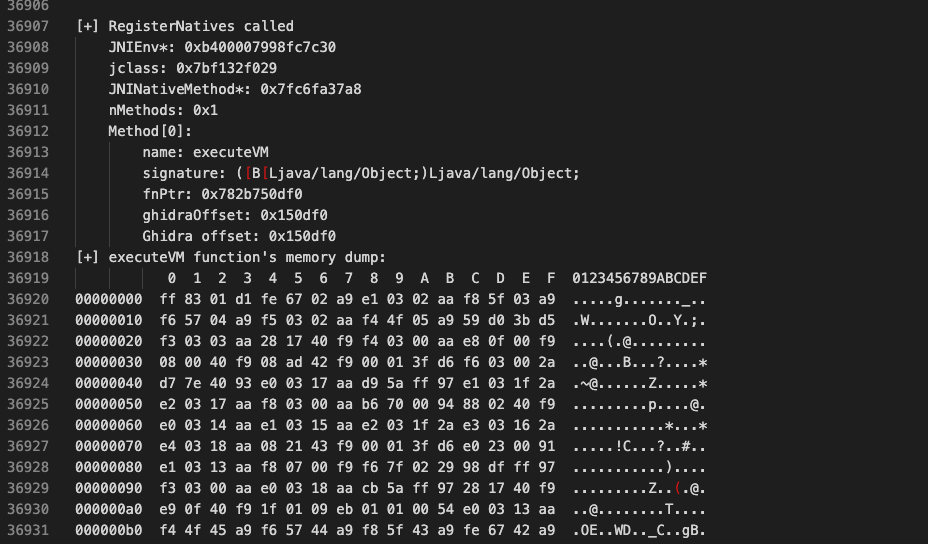
We intercept the offset we received from Stalker and reach the original RegisterNatives call. We print the details of the call we obtained from the registers. (x0,x1,x2)

Method[0]:
name: executeVM
signature: ([B[Ljava/lang/ObjectLjava/lang/Object;
fnPtr: 0x782b750df0
ghidraOffset: 0x150df0
Ghidra offset: 0x150df0
Yes! we have enough data for now. there are many methods on how to dump the library running at runtime, I will not go into detail on how to do this in order not to extend the topic further. since you know the starting address of the function, you can do this using Frida’s Memory API or various Dumper tools.
Of course, analyzing this method will not be easy, as you can imagine. You will need to spend some time with control-flow obfuscation and some time with the instruction set. In order to fully understand how the bytecodes are processed, we need to fully define the opcodes used. Now let’s dig a little deeper;
0x03: Deeper Analysis
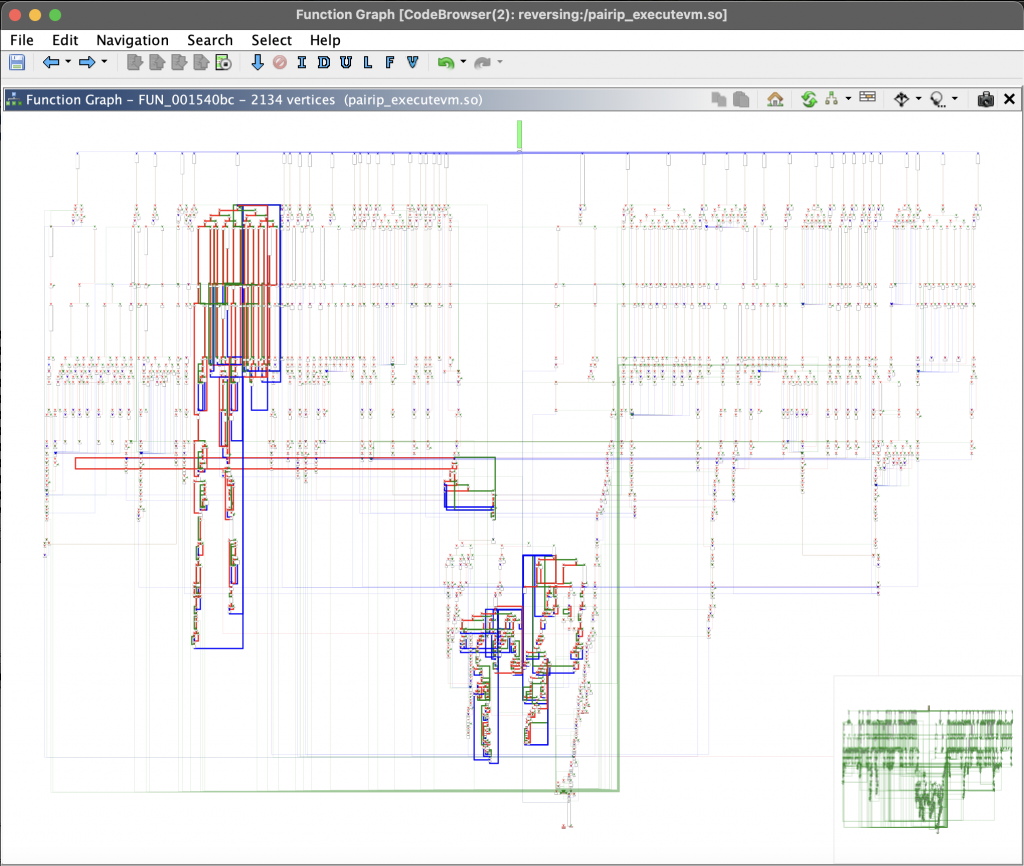
Google’s VM graph view
If you have successfully dumped the library in the runtime and correctly obtained the memory address of the executeVM method, we can take a closer look at Google’s VM structure.
The image you see above is a graphic of where all the operations you will encounter when you go to the memory address of the executeVM() method are executed. When you look at this structure, you will notice that you are facing a VM-based structure. If you haven’t, I recommend you to review the article Writing Disassemblers for VM-based Obfuscators by Tim Blazytko. Let’s briefly summarize the parts of this article that will be useful to us.
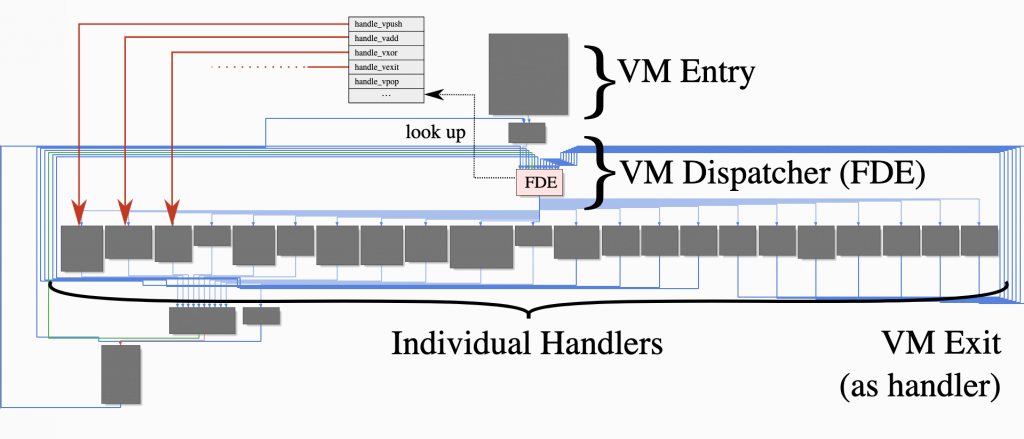
VMs basically consist of a few elements. In the VM-entry section, the necessary context for the VM is prepared; for example, registers are set, the bytecode address is determined. The green block at the top of our graph view is our VM-entry section.
FDE (Fetch-Decode-Execution): It is the cycle in which the main operations related to the program are managed. The opcode corresponding to the operation to be performed is retrieved from memory (often via a Program Counter, PC) and decoded to find the actual instruction corresponding to this opcode. During decoding, the opcode is usually controlled and decoded using a switch-case or similar if-else block. The instruction found at the end of this decoding step is then executed, and the PC is updated accordingly. Thus, this cycle (Fetch-Decode-Execute) is repeated for each subsequent opcode until the program terminates or an exit condition is reached.
The structure we call VM-dispatcher is the main switch structure that manages this FDE cycle.
Handler functions are structures that implement these opcode instructions.
The VM-exit section is where you return to normal code when the code process is finished or the last instruction is executed.
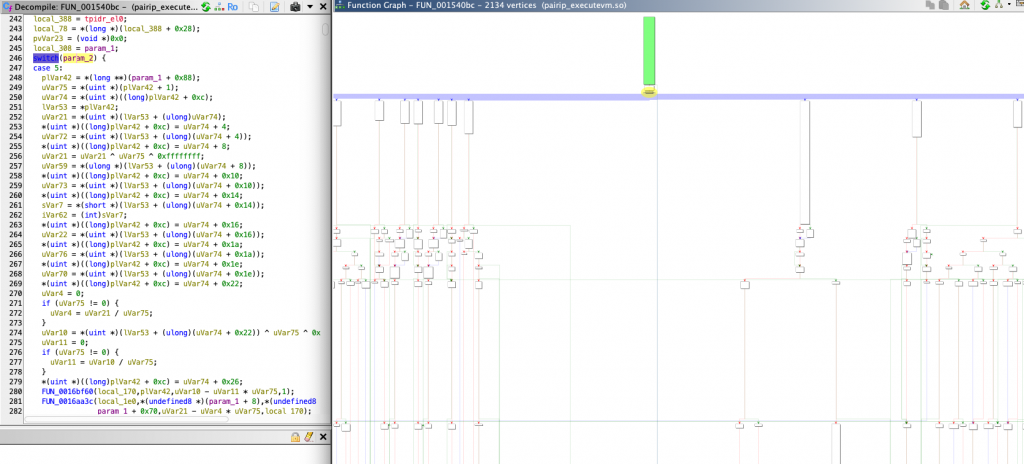
To give an example of the structures we mentioned from the library in front of us, the green block at the top is our VM-Entry block.
The yellow marked block just below is the area we call Dispatcher Loop. To understand this, if we look at the switch-case block in the psuedo code section, we can see that there is a main large switch mechanism and that opcode decoding is performed in the branching case structures underneath (the FDE structure we just mentioned). The case controls in this dispatcher loop are transmitted to the Opcode Handlers located next to each other in the chart.
After this decoding process is completed, the instructions corresponding to the opcode are executed and after the process is completed, the VM exit is made from the exit point. This process is repeated for each opcode.
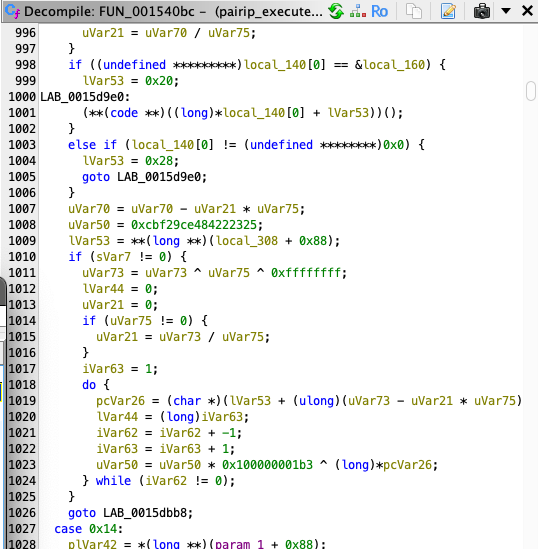
If we look at these handlers a little more closely, we can find some interesting things within the case blocks.
here when we examine all the handlers we will see some operations (like XOR) and some hash operations as repeated constants.;
uVar50 = 0xcbf29ce484222325;
...
uVar50 = uVar50 * 0x100000001b3 ^ (long)*pcVar26;
The values here can give us some ideas about how the bytecodes are executed. If the value 0xcbf29ce484222325 does not seem familiar to you, let’s explain it quickly. This value refers to the FNV-1 hash operation.
The hash value is initialized with a specific “offset basis”. For 64 bits this is typically 0xcbf29ce484222325.
FNV-1 works as follows:
hash = hash * FNV_PRIME
hash = hash ^ (data_byte)
the prime value is used as constant 0x100000001b3 in all opcode handlers. Therefore, our initialize hash value and prime value are constant for all opcode handlers.
where it simply multiplies the hash value by the prime value and then XORs the target data with this value to complete the FNV-1 hash process. here we have the first point where we can get an idea about how bytecodes are executed.
0x04: Opcodes
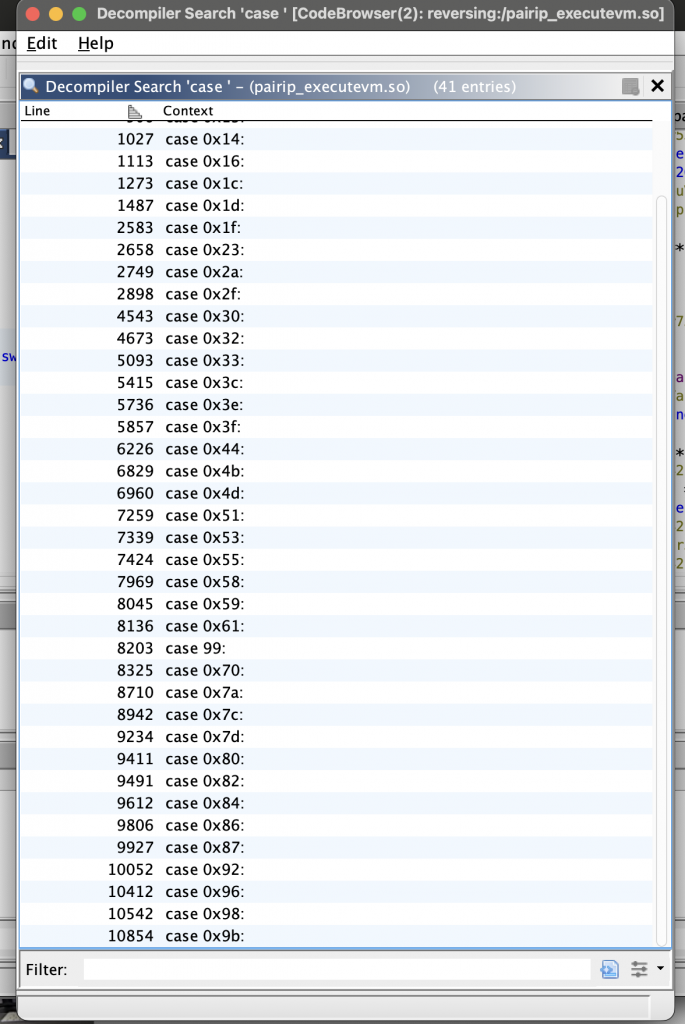
When we look at the executeVM offset where all operations are executed, we see plenty of switch-case blocks. With these case blocks, the tasks of the opcodes are allocated and each opcode has 2 different addresses for successful / unsuccessful cases. let’s do a little analysis by considering opcode 0x58.
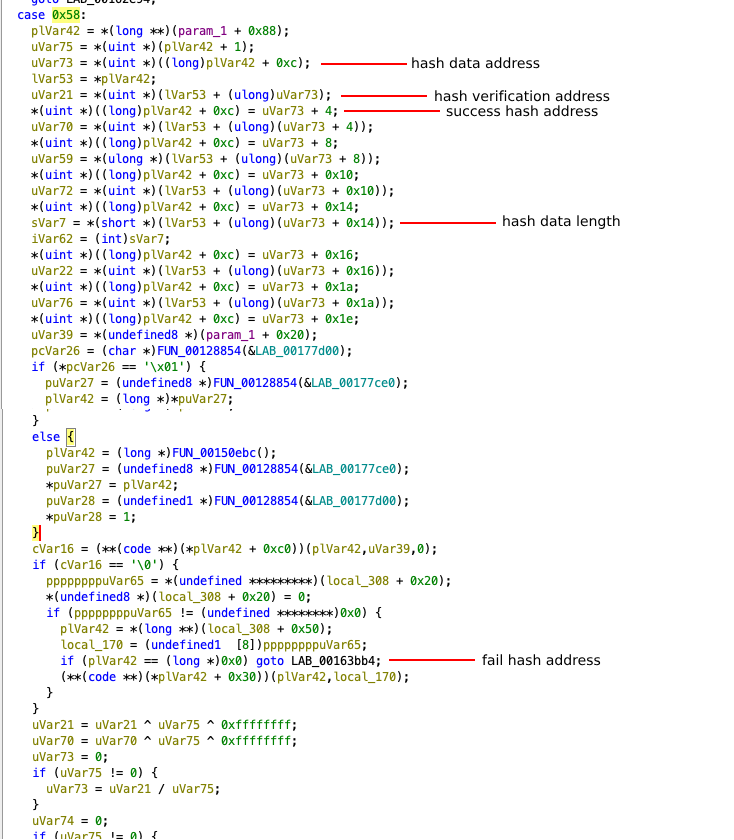
Each opcode checks the validity of the data using the FNV-1 hash algorithm in the verification step. If the hash verification is successful, the transaction is directed to the successful address. If the verification fails, it is directed to the fail address.
As seen in the pseudocode, each opcode contains 2 addresses. If an external modification is made to the opcode, the FNV-1 hash verification will always redirect execution to the fail address. This mechanism introduces uncertainty and enhances the security of the VM.
in short, before performing the opcode task, the following steps are followed;
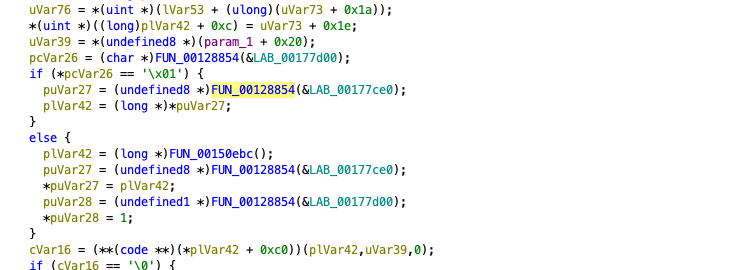
After all these calculations are completed, the opcode calls the function that will perform its main function. If we proceed from the 0x58 opcode, we see that it calls the FUN_00128854 function with different parameters according to the calculated values. Let’s examine this method closely.
pthread_ methods have caught your attention. In this method, it is simply checked with pthread_getspecific() whether this memory area has been allocated before. If it has not been allocated, this area is allocated with malloc() and its usage continues. If this area has already been allocated, it continues to use the existing memory. It also prevents more than one thread from allocating the same space with the pthread_mutex_lock() and pthread_mutex_unlock() methods.
If the currently allocated area is smaller than the area of the memory that is desired to be used, the existing area is expanded with realloc().
We can simply analyze opcodes this way. But since opcodes change during each compilation, there is no way to decode them as a fixed opcode. This can be a bit of a tiring task as it has to be analyzed from scratch each time.
0x05: Bytecode Analyze
Since the general working principle of the executeVM method is based on running the VM bytecodes in assets/, we first need to make sense of these files.
When you examine each bytecode as hex, you will often see the .IAP magic. This is not important because this magic is done by skipping the first 8 bytes when reading this bytecode in the library.
*(uint *)((long)plVar42 + 0xc) = uVar74 + 4;
If you examine the switch-case blocks carefully, you will notice that some operations repeat consistently. For example, when analyzing these lines inside the executeVM method, you can see that it reads memory by skipping 2, 4, or sometimes 8 bytes at a time.
uVar21 = *(uint *)(lVar53 + (ulong)uVar74);
uVar21 = uVar21 ^ uVar75 ^ 0xffffffff;
This suggests that specific values are consistently XORed with 0xffffffff and that mathematical operations involving offsets are applied. These processes are common across multiple handlers, suggesting a pattern in the VM’s execution flow. (what a great luck!)
puVar27 = (undefined8 *)(*(long *)(local_308 + 0x70) +
(ulong)(ushort)(uVar6 ^ (ushort)uVar21 ^ 0xffff) * 0x10);
Here, the VM computes an address by XORing specific values and applying an offset, indicating a structured approach to memory access.
The VM searches for a potential key by scanning memory in fixed increments, reading values at specific offsets. It identifies possible key locations by extracting values from memory and applying a series of transformations.
Once a potential key address is found, the VM reads a 16-bit value to determine the key length. This helps define the portion of memory that will be processed.
sVar7 = *(short *)(lVar53 + (ulong)(uVar74 + 0x14));
iVar62 = (int)sVar7;
After extracting the relevant data, the VM applies an XOR operation to modify the retrieved value. This transformation reverses obfuscation or encryption applied to stored data. To ensure the extracted data is valid, the VM computes a FNV-1 hash. This hash is calculated iteratively, applying a multiplication and XOR operation to each byte.
uVar21 = *(uint *)(lVar53 + (ulong)uVar74);
uVar21 = uVar21 ^ uVar75 ^ 0xffffffff;
....
...
uVar50 = 0xcbf29ce484222325;
do {
pcVar26 = (char *)(lVar53 + (ulong)(uVar72 - uVar21 * uVar75) + lVar44);
lVar44 = (long)iVar63;
iVar62 = iVar62 + -1;
iVar63 = iVar63 + 1;
uVar50 = uVar50 * 0x100000001b3 ^ (long)*pcVar26;
} while (iVar62 != 0);
The computed hash is then compared to a reference value stored in memory. If the hash matches, the extracted key is considered valid, and execution continues. If the validation fails, the execution is redirected to an alternative path.
if ((uVar50 ^ (long)*(int *)(**(long **)(local_308 + 0x88) + (ulong)(uVar70 - uVar21 * uVar75)))
!= uVar59) {
uVar22 = uVar76;
}
This conditional check ensures that only validated keys are utilized in the execution process.
You can examine what this analysis looks like in code by examining this repo, which has developed and tooled all the implementations we have mentioned so far in the Rust language. When you extract all the strings in the target bytecode files with the help of this tool, you may encounter interesting things. For example;
0x06: Final
PairIP, separates the Java bytecodes found in the target application from the normal application flow and transforms them into bytecode sequences compatible with Google’s custom VM. These transformed bytecodes are executed by the executeVM() native method, which is registered via RegisterNatives in the libpairipcore.so library. This approach enhances security and ensures execution integrity.
Although the PairIP VM is designed as a stack-based virtual machine, it does not fully adhere to a traditional stack-based architecture. Instead, it operates directly on memory, making it a hybrid execution model.
Additionally, PairIP utilizes the FNV-1 hash algorithm to verify the opcodes it executes. Since the opcode table is dynamically regenerated with each compilation, developing a universal decoding method is not feasible.
There are definitely more details to investigate. But this is all I have time for. Hopefully someone will come up with more interesting details so we can learn more.
You can also access the frida script file used in the article from the Gist link.
Useful Links:
Writing Disassemblers for VM-based Obfuscators
Fowler–Noll–Vo hash function - Wikipedia
GitHub - MatrixEditor/pairipcore-vm: Research on the internal workings of Google's Play Integrity Protect Virtual Machine (VM) with tools for both disassembling and decompiling the bytecode.
GitHub - Solaree/pairipcore: Public researchings of the Google's Android apps protection
DroidGuard: A Deep Dive into SafetyNet | Romain Thomas
Method[0]:
name: executeVM
signature: ([B[Ljava/lang/Object
Ljava/lang/Object;fnPtr: 0x782b750df0
ghidraOffset: 0x150df0
Ghidra offset: 0x150df0
Yes! we have enough data for now. there are many methods on how to dump the library running at runtime, I will not go into detail on how to do this in order not to extend the topic further. since you know the starting address of the function, you can do this using Frida’s Memory API or various Dumper tools.
Of course, analyzing this method will not be easy, as you can imagine. You will need to spend some time with control-flow obfuscation and some time with the instruction set. In order to fully understand how the bytecodes are processed, we need to fully define the opcodes used. Now let’s dig a little deeper;
0x03: Deeper Analysis
Google’s VM graph view
If you have successfully dumped the library in the runtime and correctly obtained the memory address of the executeVM method, we can take a closer look at Google’s VM structure.
The image you see above is a graphic of where all the operations you will encounter when you go to the memory address of the executeVM() method are executed. When you look at this structure, you will notice that you are facing a VM-based structure. If you haven’t, I recommend you to review the article Writing Disassemblers for VM-based Obfuscators by Tim Blazytko. Let’s briefly summarize the parts of this article that will be useful to us.
VMs basically consist of a few elements. In the VM-entry section, the necessary context for the VM is prepared; for example, registers are set, the bytecode address is determined. The green block at the top of our graph view is our VM-entry section.
FDE (Fetch-Decode-Execution): It is the cycle in which the main operations related to the program are managed. The opcode corresponding to the operation to be performed is retrieved from memory (often via a Program Counter, PC) and decoded to find the actual instruction corresponding to this opcode. During decoding, the opcode is usually controlled and decoded using a switch-case or similar if-else block. The instruction found at the end of this decoding step is then executed, and the PC is updated accordingly. Thus, this cycle (Fetch-Decode-Execute) is repeated for each subsequent opcode until the program terminates or an exit condition is reached.
The structure we call VM-dispatcher is the main switch structure that manages this FDE cycle.
Handler functions are structures that implement these opcode instructions.
The VM-exit section is where you return to normal code when the code process is finished or the last instruction is executed.
To give an example of the structures we mentioned from the library in front of us, the green block at the top is our VM-Entry block.
The yellow marked block just below is the area we call Dispatcher Loop. To understand this, if we look at the switch-case block in the psuedo code section, we can see that there is a main large switch mechanism and that opcode decoding is performed in the branching case structures underneath (the FDE structure we just mentioned). The case controls in this dispatcher loop are transmitted to the Opcode Handlers located next to each other in the chart.
After this decoding process is completed, the instructions corresponding to the opcode are executed and after the process is completed, the VM exit is made from the exit point. This process is repeated for each opcode.
If we look at these handlers a little more closely, we can find some interesting things within the case blocks.
here when we examine all the handlers we will see some operations (like XOR) and some hash operations as repeated constants.;
uVar50 = 0xcbf29ce484222325;
...
uVar50 = uVar50 * 0x100000001b3 ^ (long)*pcVar26;
The values here can give us some ideas about how the bytecodes are executed. If the value 0xcbf29ce484222325 does not seem familiar to you, let’s explain it quickly. This value refers to the FNV-1 hash operation.
The hash value is initialized with a specific “offset basis”. For 64 bits this is typically 0xcbf29ce484222325.
FNV-1 works as follows:
hash = hash * FNV_PRIME
hash = hash ^ (data_byte)
the prime value is used as constant 0x100000001b3 in all opcode handlers. Therefore, our initialize hash value and prime value are constant for all opcode handlers.
where it simply multiplies the hash value by the prime value and then XORs the target data with this value to complete the FNV-1 hash process. here we have the first point where we can get an idea about how bytecodes are executed.
0x04: Opcodes
When we look at the executeVM offset where all operations are executed, we see plenty of switch-case blocks. With these case blocks, the tasks of the opcodes are allocated and each opcode has 2 different addresses for successful / unsuccessful cases. let’s do a little analysis by considering opcode 0x58.
Each opcode checks the validity of the data using the FNV-1 hash algorithm in the verification step. If the hash verification is successful, the transaction is directed to the successful address. If the verification fails, it is directed to the fail address.
As seen in the pseudocode, each opcode contains 2 addresses. If an external modification is made to the opcode, the FNV-1 hash verification will always redirect execution to the fail address. This mechanism introduces uncertainty and enhances the security of the VM.
in short, before performing the opcode task, the following steps are followed;
- The data required for hash verification is read from memory.
- The hash length is determined to specify how many bytes will be used for verification.
- The expected hash value is retrieved from memory for comparison.
- Verification is performed using the FNV-1 hash function.
- If the computed hash matches the expected value, execution proceeds to the success address.
- If the computed hash does not match, execution jumps to the fail address.
After all these calculations are completed, the opcode calls the function that will perform its main function. If we proceed from the 0x58 opcode, we see that it calls the FUN_00128854 function with different parameters according to the calculated values. Let’s examine this method closely.
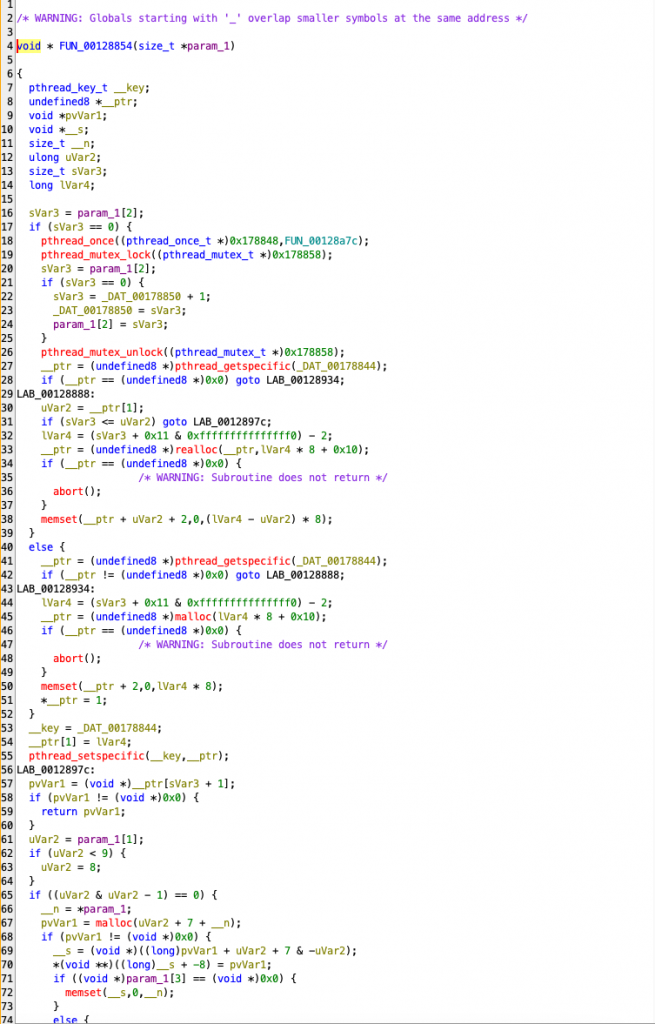
pthread_ methods have caught your attention. In this method, it is simply checked with pthread_getspecific() whether this memory area has been allocated before. If it has not been allocated, this area is allocated with malloc() and its usage continues. If this area has already been allocated, it continues to use the existing memory. It also prevents more than one thread from allocating the same space with the pthread_mutex_lock() and pthread_mutex_unlock() methods.
If the currently allocated area is smaller than the area of the memory that is desired to be used, the existing area is expanded with realloc().
| Code Line / Function | Functionality | Description | |||||||||||||||||||||||||||
|---|---|---|---|---|---|---|---|---|---|---|---|---|---|---|---|---|---|---|---|---|---|---|---|---|---|---|---|---|---|
| pthread_once(FUN_00128a7c) | One-time initialization | Ensures that global configuration or memory settings are executed only once. | pthread_mutex_lock() | Synchronization | Acquires a lock to prevent race conditions when multiple threads try to access memory. | sVar3 = param_1[2]; | Memory ID check | Checks if a unique ID has been assigned to the thread. | pthread_getspecific(_DAT_00178844); | Check existing memory | Determines if a thread-specific memory block has already been allocated. | malloc(lVar4 * 8 + 0x10); | New memory allocation | Allocates a new memory block if no previous allocation exists. | realloc(__ptr, lVar4 * 8 + 0x10); | Expand memory | If existing memory is insufficient, it expands the allocated space using realloc(). | memset(__ptr + 2, 0, lVar4 * 8); | Initialize memory | Clears the allocated memory for security and stability. | pthread_setspecific(__key, __ptr); | Save thread-specific memory | Stores the allocated memory block for the thread so it can be accessed later. | return pvVar1; | Return allocated memory | The thread can now use its assigned memory block. | pthread_mutex_unlock(); | Release lock | Allows other threads to access memory once allocation is complete. |
0x05: Bytecode Analyze
Since the general working principle of the executeVM method is based on running the VM bytecodes in assets/, we first need to make sense of these files.
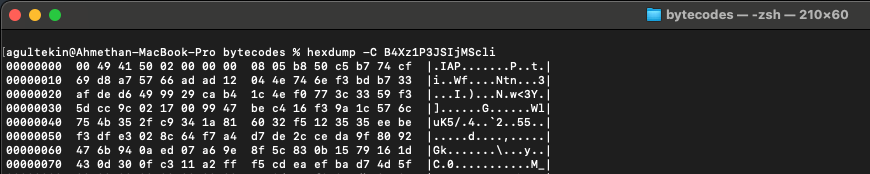
When you examine each bytecode as hex, you will often see the .IAP magic. This is not important because this magic is done by skipping the first 8 bytes when reading this bytecode in the library.
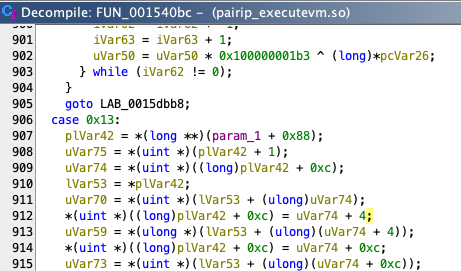
*(uint *)((long)plVar42 + 0xc) = uVar74 + 4;
If you examine the switch-case blocks carefully, you will notice that some operations repeat consistently. For example, when analyzing these lines inside the executeVM method, you can see that it reads memory by skipping 2, 4, or sometimes 8 bytes at a time.
uVar21 = *(uint *)(lVar53 + (ulong)uVar74);
uVar21 = uVar21 ^ uVar75 ^ 0xffffffff;
This suggests that specific values are consistently XORed with 0xffffffff and that mathematical operations involving offsets are applied. These processes are common across multiple handlers, suggesting a pattern in the VM’s execution flow. (what a great luck!)
puVar27 = (undefined8 *)(*(long *)(local_308 + 0x70) +
(ulong)(ushort)(uVar6 ^ (ushort)uVar21 ^ 0xffff) * 0x10);
Here, the VM computes an address by XORing specific values and applying an offset, indicating a structured approach to memory access.
The VM searches for a potential key by scanning memory in fixed increments, reading values at specific offsets. It identifies possible key locations by extracting values from memory and applying a series of transformations.
Once a potential key address is found, the VM reads a 16-bit value to determine the key length. This helps define the portion of memory that will be processed.
sVar7 = *(short *)(lVar53 + (ulong)(uVar74 + 0x14));
iVar62 = (int)sVar7;
After extracting the relevant data, the VM applies an XOR operation to modify the retrieved value. This transformation reverses obfuscation or encryption applied to stored data. To ensure the extracted data is valid, the VM computes a FNV-1 hash. This hash is calculated iteratively, applying a multiplication and XOR operation to each byte.
uVar21 = *(uint *)(lVar53 + (ulong)uVar74);
uVar21 = uVar21 ^ uVar75 ^ 0xffffffff;
....
...
uVar50 = 0xcbf29ce484222325;
do {
pcVar26 = (char *)(lVar53 + (ulong)(uVar72 - uVar21 * uVar75) + lVar44);
lVar44 = (long)iVar63;
iVar62 = iVar62 + -1;
iVar63 = iVar63 + 1;
uVar50 = uVar50 * 0x100000001b3 ^ (long)*pcVar26;
} while (iVar62 != 0);
The computed hash is then compared to a reference value stored in memory. If the hash matches, the extracted key is considered valid, and execution continues. If the validation fails, the execution is redirected to an alternative path.
if ((uVar50 ^ (long)*(int *)(**(long **)(local_308 + 0x88) + (ulong)(uVar70 - uVar21 * uVar75)))
!= uVar59) {
uVar22 = uVar76;
}
This conditional check ensures that only validated keys are utilized in the execution process.
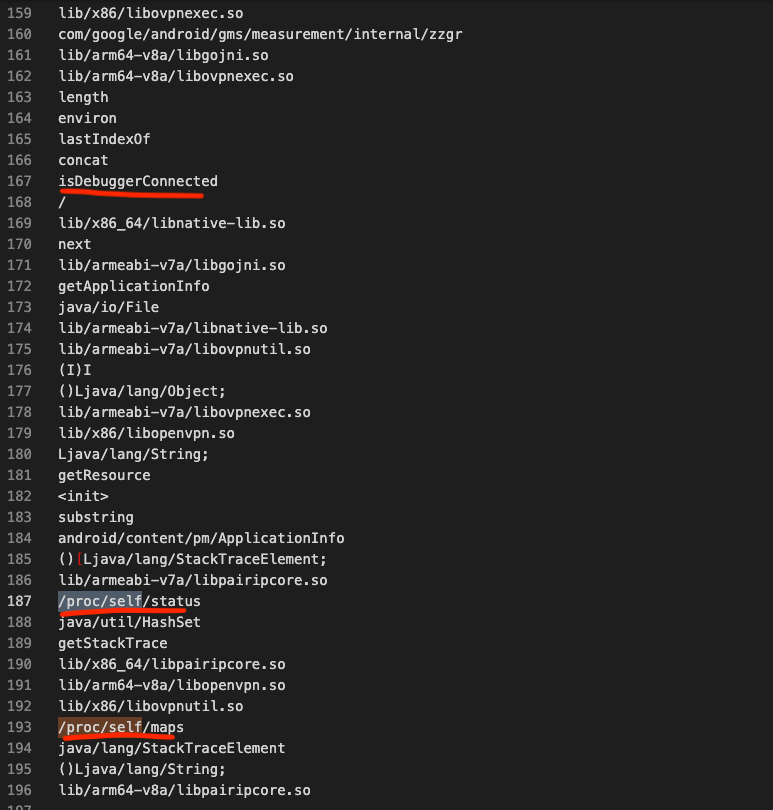
You can examine what this analysis looks like in code by examining this repo, which has developed and tooled all the implementations we have mentioned so far in the Rust language. When you extract all the strings in the target bytecode files with the help of this tool, you may encounter interesting things. For example;
0x06: Final
PairIP, separates the Java bytecodes found in the target application from the normal application flow and transforms them into bytecode sequences compatible with Google’s custom VM. These transformed bytecodes are executed by the executeVM() native method, which is registered via RegisterNatives in the libpairipcore.so library. This approach enhances security and ensures execution integrity.
Although the PairIP VM is designed as a stack-based virtual machine, it does not fully adhere to a traditional stack-based architecture. Instead, it operates directly on memory, making it a hybrid execution model.
Additionally, PairIP utilizes the FNV-1 hash algorithm to verify the opcodes it executes. Since the opcode table is dynamically regenerated with each compilation, developing a universal decoding method is not feasible.

There are definitely more details to investigate. But this is all I have time for. Hopefully someone will come up with more interesting details so we can learn more.
You can also access the frida script file used in the article from the Gist link.
Useful Links:
Writing Disassemblers for VM-based Obfuscators
Fowler–Noll–Vo hash function - Wikipedia
GitHub - MatrixEditor/pairipcore-vm: Research on the internal workings of Google's Play Integrity Protect Virtual Machine (VM) with tools for both disassembling and decompiling the bytecode.
GitHub - Solaree/pairipcore: Public researchings of the Google's Android apps protection
DroidGuard: A Deep Dive into SafetyNet | Romain Thomas
