
Android 14 has been on its preview schedule since February with Google releasing several previews and betas along the way and Pixel users are now finally getting the final public version. You’ll need a Pixel 4a 5G or newer Pixel device to test the latest version of Android. Android OEMs including Samsung, iQOO, Nothing, OnePlus, Oppo, Realme, Sharp, Sony, Tecno, vivo and Xiaomi are expected to roll out Android 14 updates to their devices in the coming months.

The customization options detailed by Google earlier this year are now here with generative AI wallpapers coming first to the Pixel 8 and Pixel 8 Pro with text-to-image diffusion patterns.


Generative AI Wallpapers
You can also change the look of the lock screen with different font styles, color palettes, and custom widget shortcuts for one-touch access to things like the QR reader or the Google Home app. Google has also added home screen templates that make it easy to choose your style and these will adapt based on your situation with widgets like the weather app becoming more important when there’s a storm.
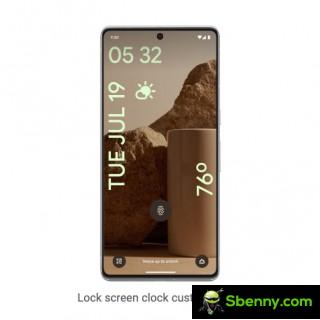

New lock screen customization options
Android 14 also brings support for HDR images with Ultra HDR helping your photos look more vibrant, native spatial audio support, cross-device copy/paste, and a new media player. Privacy and security are two other focal points Health Connect is built into Android 14 and stores and encrypts all your personal health data locally on your device. You will also be notified when apps want to share your location data with third parties, and you can refuse access to your data.
Android 14 gets improved passkey support with support for fingerprint authentication in third-party apps and an updated 6-digit PIN lock screen option. Google is also introducing new accessibility features like improved pinch-to-zoom magnification and variable zoom sizes. Android 14 supports faster font size changes from the quick settings menu with non-linear scaling for easier readability. There is a dedicated hearing aid setup in the Accessibility settings and more options for routing audio to various outputs.


Start a new Thread