
 Trusted by over 1.6 million members since 2014 — why not join them?
Snailsoft
∞ and beyond!
- Gender
- Not specified
- Device
- 6502
- Country
- Canada


Virtual Master - Android Clone v3.2.39
MOD Features How to install
Download Link
-
Virtual Master runs another Android System on your device, based on our Android on Android Virtualization Technology.
With Virtual Master, you can have another Android System running on your device, isolated from the Android System of your device.
The new Android System is equivalent to a Parallel Space, or a Virtual Phone, similar to a Cloud Phone, but runs locally.
In the new Android System, you can install its own Apps, arrange its own Launcher, set its own Wallpaper, and customize it as your needs.
You can run multiple Android Systems in Virtual Master, One for Work, One for Game, One for Privacy, and enjoy more fun on one device.
It's an Android Virtual Machine, just like your another phone!
1. Play with multiple Social or Game Accounts at the same time
Games and Apps are cloned after being imported into Virtual Master.
We support almost all Social Apps and Games, you can sign in to multiple accounts at the same time on one device and switch between them freely.
2. Run multiple Apps or Games at the same time
We support background running, that means the Apps and Games can keep running when in background.
So, for example, you can run a game in Virtual Master, but watch a video on your device at the same time.
Just like bringing the emulators such as Bluestacks and Nox to your device.
3. Support Vulkan
We support Vulkan in the Virtual Android System, so you can run many high-end games smoothly in Virtual Master.
4. Protect your Privacy
When Apps and Games run in the Virtual Android System, they can not get any information about your device, like contacts, sms, device id, etc.
So, you can run any Apps or Games in it without worrying about leaking your privacy. It can be used as your Privacy Sandbox.
FAQ from the developer:
1. How much disk space does Virtual Master need?
Virtual Master runs a whole android 7.1.2 system. It needs to download about 300MB system image and requires about 1.6GB disk space to run. It will use more disk space if apps are installed or upgraded in the VM.
2. How long does it take for the Virtual Master to boot?
For the first time you run it, it will take 1 ~ 2 minutes, because we need some time to install the android image on device. After that, it will take only 4 ~ 10 seconds. The exact time depends on the performance of your device and the load at that time.
3. Can Virtual Master be installed in multi-user?
Virtual Master MUST BE installed in the device owner or administrator now.
4. What to do if Virtual Master can't boot?
In most cases, some system file is damaged. Please ensure you have enough disk space, kill the app and reboot. If rebooting doesn't work, you can try the 'Repair VM' in VM Settings. Finally, you can try uninstalling and reinstalling.
CPU Architecture: arm64-v8a
You can play and install this app without root permissions.
You can play this game even without any Internet Connection.
Load Additional Info
This custom version has been months in the making and worked on by many modders, hence why I am releasing it as a Shared app rather than my usual Release mods. Please do not ask for updates as the official app doesn't function the same way as this mod.
Using code from VMOS and VPhoneOS, this mod can run multiple Android OS's, without cloud rental, and includes all needed files in a single APK - no additional downloads required.
Magisk and SuperUser features included for root functions, all without touching your host device.

Importing and exporting entire OS's makes it easy to share or simply backup the virtual device.
All of the typical malware has been removed.
This version has been designed and tested for Android 15 and up.
Tested on both 15 and 16 to work.
Strongly suggest a modern device for both speed and storage.
I'm using an 8 core 2.7GHz processor with 2TB storage and the virtual devices perform at 100%.
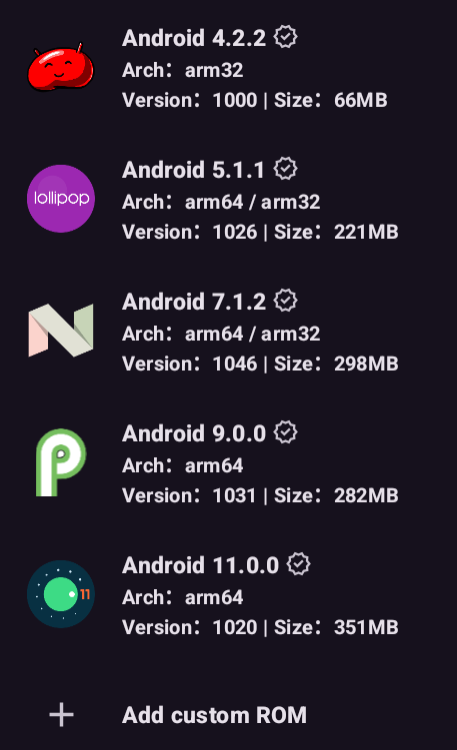
Note: Although Android 11 is provided, most games run better on Android 9.
• App not installing/saying not compatible and you're running Android 14? Then you may need to install and use VPhoneOS on your phone by clicking here or, if have a computer, visit this page from PC and click here. This should help you. If not, read this: how to install mod apk files on Android 14 or newer.
Before reading the installation instructions below, if you need help about how to use our website, please watch a simple video tutorial we created, about How to Download & Install apk files from sbenny.com by clicking here.
Download the desired APK file and tap on it to install it on your device. Make also sure to uninstall your game first if you have it installed!
• App not installing/saying not compatible and you're running Android 14? Then you need to install VPhoneOS on your phone by clicking here or, if have a computer, visit this page from PC and click here. Also, make sure you turned off "Play Protect" from the Google Play Store app, as it prevents installing mods. This should help you. If not, read this: how to install mod apk files on Android 14 or newer.
If you need help about how to use our website, please watch this simple video tutorial below about How to Download & Install apk files from sbenny.com.
Code:https://play.google.com/store/apps/details?id=com.clone.android.dual.space&hl=en_US


