

 Trusted by over 1.6 million members since 2014 — why not join them?
Snailsoft
∞ and beyond!
Staff Member
Moderator
SB Mod Squad ⭐
✔ Approved Releaser
Active User
Member for 2 years
- Gender
- Not specified
- Device
- 6502
- Country
- Canada
Install With Options v0.9.2
MOD Features How to install
Type of release: Free
Download Link (how to download?)
🔒 Hidden content
You need to Register or Login in order to view this content. Since you're viewing the AMP-accelerated version of our website which doesn't store login cookies, please scroll to the bottom of this page and click on the "View Non-AMP Version" button first, thanks!
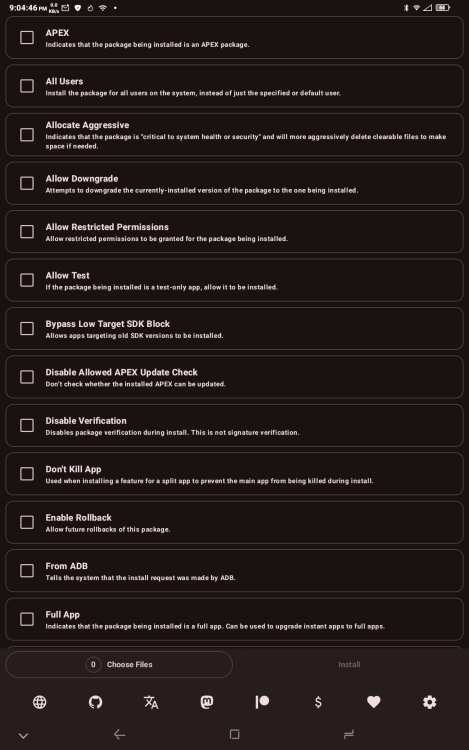
An app with a simple purpose: more advanced app installs without needing to use ADB.
Install with Options uses Shizuku to run with shell permissions, allowing you to install test-only apps, bypass Android 14's target SDK limit, downgrade certain packages, and more, all without leaving your phone (at least on Android 11 and later).
It also supports installing split APKs or batch-installing multiple separate apps.
CPU Architecture: armeabi-v7a & arm64-v8a
No: you can play and install this app without root permissions.
No: you can use this app even without any Internet Connection.
Load Additional Info
None. This is a FOSS app.
This app requires, Shizuku, an app that gives sudo root on non rooted devices.
• App not installing/saying not compatible and you're running Android 14? Then you may need to install and use VPhoneOS on your phone by clicking here or, if have a computer, visit this page from PC and click here. This should help you. If not, read this: how to install mod apk files on Android 14 or newer.
Before reading the installation instructions below, if you need help about how to use our website, please watch a simple video tutorial we created, about How to Download & Install apk files from sbenny.com by clicking here.
Download the desired APK file below and tap on it to install it on your device.
• App not installing/saying not compatible and you're running Android 14? Then you need to install VPhoneOS on your phone by clicking here or, if have a computer, visit this page from PC and click here. Also, make sure you turned off "Play Protect" from the Google Play Store app, as it prevents installing mods. This should help you. If not, read this: how to install mod apk files on Android 14 or newer.
If you need help about how to use our website, please watch this simple video tutorial below about How to Download & Install apk files from sbenny.com.
 No videos yet. If you would like to thank Snailsoft and gain some extra SB Points, record your gameplay and share it here.
Code:https://github.com/zacharee/InstallWithOptions


