

 Trusted by over 1.6 million members since 2014 — why not join them?
- Gender
- Not specified
- Device
- 6502
- Country
- Canada

Location Changer - Fake GPS
v3.45MOD Features How to install
Download Link (how to download?)
-
Oh man, let me tell you about this app I stumbled upon called “Location Changer - Fake GPS.” So, I was just casually browsing for something to spice up my digital life when I found this gem. Seriously, this app is like a game-changer for anyone who loves to mess around with their phone settings and wants to experiment with a little bit of digital trickery.

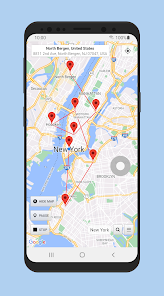
First off, the app is super easy to use, even if you're not tech-savvy. You just open it up, pick a spot on the map, and boom! Your phone thinks you're chilling in Paris when you’re actually just lounging on your couch.
I mean, how cool is that? And trust me, it really comes in handy when you want to access content that's geo-restricted or just want to prank your friends by pretending you're on a spontaneous overseas trip.

One of my favorite things about it is how smooth and seamless it works. Like, no annoying glitches or anything. I read a ton of reviews before downloading, and this one user totally nailed it when they said it's like having a mini teleportation device in your pocket. I was like, "Yasss, exactly!"
The app's design is straightforward, which is honestly a relief. Who wants to deal with complicated settings when you're just trying to have some fun, right?
Oh, and the customization options are a nice touch. You can set favorite locations and even simulate movement along a route. A friend of mine used it to prank his Instagram followers, making it look like he was on this epic road trip. The comments were hilarious!
Overall, if you're looking to add a little flair to your digital life or just want to explore some tech magic, this app is a must-try. It’s fun, practical, and just a little bit mischievous. Give it a shot, and who knows, maybe you’ll find yourself virtually traveling more than in real life!
CPU Architecture: armeabi-v7a & arm64-v8a
No: you can play and install this app without root permissions.
Yes: you need an active Internet Connection to use this app.
Load Additional Info
AES/PairIP/SHA-256/BASE64 protection's bypassed.
Premium unlocked.
Analytics and ad's removed.
Google Maps API key replaced. Google is now charging developers $200/month to embed maps. Thanks to Furjack for providing a working API key.
From Settings/More, Export any locations you have set.
You will need to uninstall prior versions.
Once installed you can import any settings/favorites you may have saved.
• App not installing/saying not compatible and you're running Android 14? Then you may need to install and use VPhoneOS on your phone by clicking here or, if have a computer, visit this page from PC and click here. This should help you. If not, read this: how to install mod apk files on Android 14 or newer.
Before reading the installation instructions below, if you need help about how to use our website, please watch a simple video tutorial we created, about How to Download & Install apk files from sbenny.com by clicking here.
Download the desired APK file below and tap on it to install it on your device.
• App not installing/saying not compatible and you're running Android 14? Then you need to install VPhoneOS on your phone by clicking here or, if have a computer, visit this page from PC and click here. Also, make sure you turned off "Play Protect" from the Google Play Store app, as it prevents installing mods. This should help you. If not, read this: how to install mod apk files on Android 14 or newer.
If you need help about how to use our website, please watch this simple video tutorial below about How to Download & Install apk files from sbenny.com.
 No videos yet. If you would like to thank Snailsoft and gain some extra SB Points, record your gameplay and share it here.
Code:https://play.google.com/store/apps/details?id=com.locationchanger&hl=en_US


