
iOS took the stage first during Apple’s WWDC keynote and it took more than 40 minutes for Craig Federighi and the team to tell us all about the new updates.
The greatest of all is the new screen lock. Apple calls it the biggest update ever. Whether you’ve set a photo, static wallpaper, or any of the new live wallpapers, you’ll be able to customize the look of the date and time part. Each element can be deeply customized with different fonts, colors, shades of those colors and by adding widgets.

You will be able to customize which one widget shown below the date and time. Notifications on the lock screen are now more discreet – they will take up the bottom of the screen, so they don’t block a photo you’ve placed as wallpaper. You can go further with the photos using Photo Shuffle, which will either mix the photos you have preselected or choose for you if you like.


The new lock screen
The Live activity The API will allow for more condensed notifications with real-time updates – think sports game scoreboard or food delivery tracker.

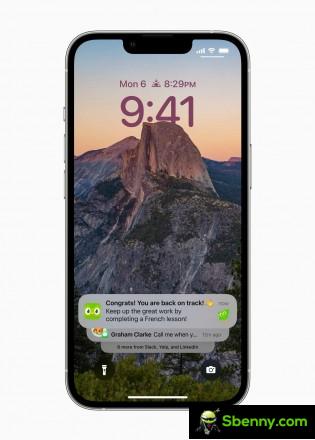
Live activity
Apple didn’t mention anything of a always on display mode on the way, so we’re assuming the feature has been dropped or it will be an iPhone 14 Pro exclusive after all.
Focus – iOS de facto profiles now extend to the lock screen. You’ll be able to choose your desired focus directly from the lock screen and change which apps can show notifications, the UI look and feel, and once you get past the lock screen, the same focus will continue on the home screen.

Focus
Messages has received three big updates in iOS 16. Now you can edit a message, cancel sending a message (Apple calls it Undo Send), and mark conversations as unread. The dictation got a few minutes of transmission. It is now much better and completely on the device (does not require a data connection). You can seamlessly switch between dictation and keyboard typing. There’s automatic emoji recognition, automatic punctuation, and full Siri support.

Cancel Send or Edit a message
Live textthe feature that allows you to copy text from photos, will also work in videos.
The next is Apple wallet. In iOS 16, apps will be able to log into Wallet to verify you, and you’ll only be able to share the information they need (only your age, not your birthday). You will be able to share virtual keys via Wallet to Messages or specific third-party apps.


Updates for Apple Wallet
Apple pays later allows you to split a purchase into four equal payments for up to six weeks. Apple Pay Order Tracking will save detailed receipts in Wallet and show order tracking information.
With iCloud Shared Photo Library, you will be able to create a separate iCloud library for up to six people to add photos from their libraries or share based on a start date or people in photos.
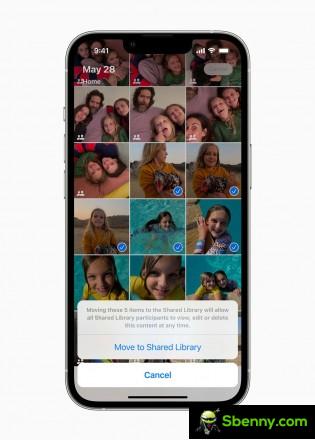

Shared photo library
The enhanced Apple maps will arrive in 11 other countries, including France, Switzerland and New Zealand. Maps introduced the multi-stop route, which allows you to add up to 15 stops to a trip. The city experiences will show a 3D version of Las Vegas, as well as six other cities, including Miami, Chicago and Sydney. The new look will include 3D scans, elevation and transit navigation.
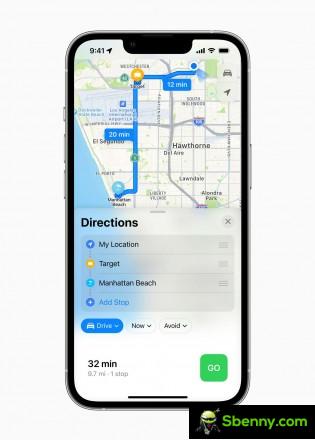
Adding stops to Apple Maps
Apple showed the new generation CarPlay, which will come to cars at the end of next year. It has been completely redesigned and will work on all screens available in a car, including the driver display. CarPlay will be able to show data such as speed, RPM, fuel and temperature levels, which will come directly from the vehicle. And it will allow full customization on all screens.

The iOS Developer Preview is available to Developer Program members starting today, and a public beta will arrive for iOS users next month. The final version of iOS 16 will arrive in September right after the announcement of the iPhone 14.


Start a new Thread