

 Trusted by over 1.6 million members since 2014 — why not join them?
- Gender
- Male
- Device
- Oppo F11 - Android 11, Acer Nitro 5
- Country
- Indonesia
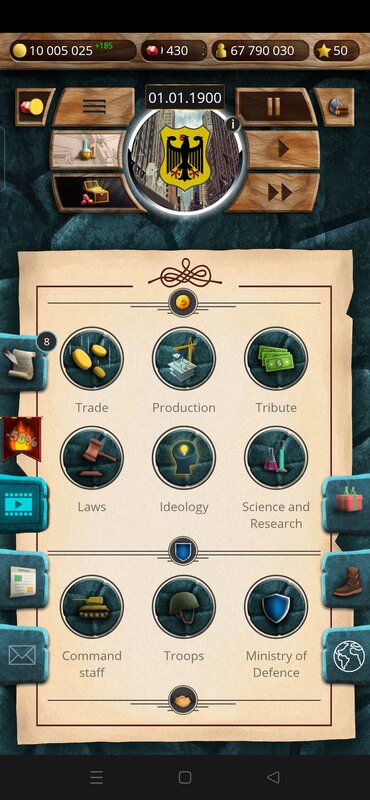


20th Century – Alternative History
v1.0.25MOD Features How to install
Download Link (how to download?)
-
Exciting military strategy
You wish to become an emperor, a king or a president? This game is just what you are looking for. You can enter the role of a ruler of the 20th century country. You have everything to write a new history. The game has no world wars, nuclear attacks on Japanese cities… Our aim is not to create a plot based on history. Our goal is to give you an opportunity to write your very own history! In this new history, are you a peacekeeper or an aggressor? It is up to you to decide!
Gameplay key features:
• Over 60 countries you can rule;
• Build an army and a fleet;
• Wage wars against other countries, fight separatism and looting
• Gain resources: oil, iron, stone, lead, rubber etc;
• Non-aggression pacts, trade agreements and embassies;
• Law and religion management;
• Researches;
• Trade;
• Colonization;
• the League of Nations.
Epic military strategy of incredible scale. Are you ready to defend your homeland?
You can play and install this app without root permissions.
You can play this game even without any Internet Connection.
Load Additional Info
Free IAP
• App not installing/saying not compatible and you're running Android 14? Then you may need to install and use VPhoneOS on your phone by clicking here or, if have a computer, visit this page from PC and click here. This should help you. If not, read this: how to install mod apk files on Android 14 or newer.
Before reading the installation instructions below, if you need help about how to use our website, please watch a simple video tutorial we created, about How to Download & Install apk files from sbenny.com by clicking here.
Download the desired APK file and tap on it to install it on your device. Make also sure to uninstall your game first if you have it installed!, This is NOT a traditional MOD APK: this is a "Pre-Patched apk" and you MUST have LP (Lucky Patcher ) installed in your device to use this. You do not need to create a patched apk but only to tap "YES" when prompted by LP. Be sure you're using the last version of LP to make sure it works for you (guide about how to use lucky patcher here) (or the one available at the time this thread has been created). You can download Lucky Patcher by clicking here.
• App not installing/saying not compatible and you're running Android 14? Then you need to install VPhoneOS on your phone by clicking here or, if have a computer, visit this page from PC and click here. Also, make sure you turned off "Play Protect" from the Google Play Store app, as it prevents installing mods. This should help you. If not, read this: how to install mod apk files on Android 14 or newer.
If you need help about how to use our website, please watch this simple video tutorial below about How to Download & Install apk files from sbenny.com.
 No videos yet. If you would like to thank Qwertyuiopasdf and gain some extra SB Points, record your gameplay and share it here.
Code:https://play.google.com/store/apps/details?id=com.oxiwyle.alternativehistory20tgcentury&hl=en&gl=US&referrer=utm_source=google&utm_medium=organic&utm_term=20th+century+–+alternative+history&pcampaignid=APPU_1_O8pjYNpyycv6BJXXlbAP


