Mod apk Clockmaker - Fabulous Match 3 Game v 51.1.0 + mod _ Rubies & Much more + Free purchases in the app+ No Ads (updated)

Trusted by over 1.6 million members since 2014 — why not join them?
Log in or Register to join us!

Feedbacks


  • Total voters
    3
  • Poll closed .

Status
Not open for further replies.

Marialisa

LP Mod Queen ? From Sbennytopia ??
Member for 6 years


Clockmaker V 51.1.0


MOD Features  How to install

Credits to: Marialisa
Type of release: Paid

Download Link (how to download?)
Download FileSince you're viewing the AMP-accelerated version of our website which doesn't store login cookies, please scroll to the bottom of this page and click on the "View Non-AMP Version" button first, thanks!


  • Ready for a new travel season? Coming February 10th: exciting new tasks, unforgettable adventures, and fantastic prizes.

    Meet Horatio the monkey, our resident trickster! If you help him collect green gems, he'll show you a firework trick.

    If you give a man a fish, he'll eat for a day, but if you give him exciting levels with fish and seashells, he'll enjoy playing Clockmaker for much longer than that! 100 new levels are here now!Live an incredible adventure. Solve Match 3 puzzles and save a city.

    A fantastic adventure awaits you. Solve puzzles and save the village from the Old Watchmaker's terrible curse.

    Features:
    - Intense mystical atmosphere
    - Over 550 puzzles to solve
    - Monthly updates: holiday adventures with rewards and prizes!
    - All puzzles available at no additional cost
    - Access via Facebook
    - HD support

  •   
    You can play and install this app without root permissions.

      
    You need an active Internet Connection to play this game.

    Load Additional Info


  • Rubies, & much more + Free purchases ,+no ads

  • • App not installing/saying not compatible and you're running Android 14? Then you may need to install and use VPhoneOS on your phone by clicking here or, if have a computer, visit this page from PC and click here. This should help you. If not, read this: how to install mod apk files on Android 14 or newer.
    Before reading the installation instructions below, if you need help about how to use our website, please watch a simple video tutorial we created, about How to Download & Install apk files from sbenny.com by clicking here.

    This is NOT a traditional MOD APK: this is a "Pre-Patched apk" and you MUST have LP (Lucky Patcher ) installed in your device to use this. You do not need to create a patched apk but only to tap "YES" when prompted by LP. Be sure you're using the last version of LP to make sure it works for you (guide about how to use lucky patcher here) (or the one available at the time this thread has been created). You can download Lucky Patcher by clicking here., This is a SPLIT APK. In order to install this, you need to install the "Split APK Installer " App on your phone. Then, open it, tap on"Install APKs" and select the downloaded file in order to install it. If the app doesn't install for some reason, open the settings at the top-left of Split APKS Installer and enable the "Sign APK" option and then try again.


    • App not installing/saying not compatible and you're running Android 14? Then you need to install VPhoneOS on your phone by clicking here or, if have a computer, visit this page from PC and click here. Also, make sure you turned off "Play Protect" from the Google Play Store app, as it prevents installing mods. This should help you. If not, read this: how to install mod apk files on Android 14 or newer.


    If you need help about how to use our website, please watch this simple video tutorial below about How to Download & Install apk files from sbenny.com.


  • Code:
    https://play.google.com/store/apps/details?id=com.belkatechnologies.clockmaker


DarthVoda

Savage Lv6️⃣
Member for 8 years
Much to my chagrin, I am unable to install this mod. When trying to install an error message appears, saying that it can't be installed "Yada, Yada, Yada, Yada". Here's the message as it appears on my phone:

App not installed
INSTALL_PARSE_FAILED_NO_CERTIFICAT
ES: Scanning Failed.: No signature found in
package of version 2 or newer for package
com.belkatechnologies.clockmaker
 

Marialisa

LP Mod Queen ? From Sbennytopia ??
Member for 6 years
Much to my chagrin, I am unable to install this mod. When trying to install an error message appears, saying that it can't be installed "Yada, Yada, Yada, Yada". Here's the message as it appears on my phone:

App not installed
INSTALL_PARSE_FAILED_NO_CERTIFICAT
ES: Scanning Failed.: No signature found in
package of version 2 or newer for package
com.belkatechnologies.clockmaker
You have to install it with Sai Apks installer this is the link
 

Debby

SB Cartel Max Level
Staff Member
♥ Sea Queen
Active User
Member for 10 years

DarthVoda

Savage Lv6️⃣
Member for 8 years
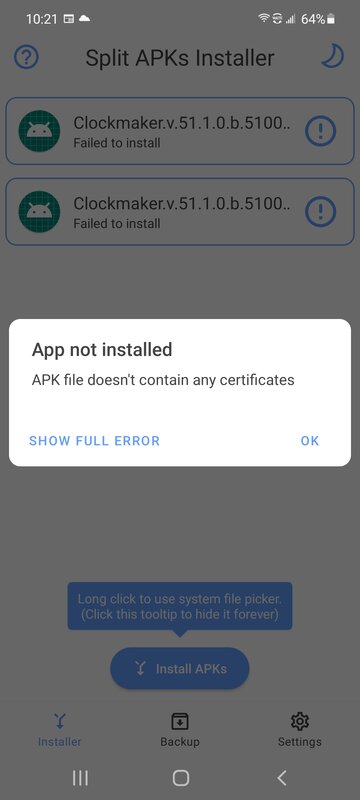
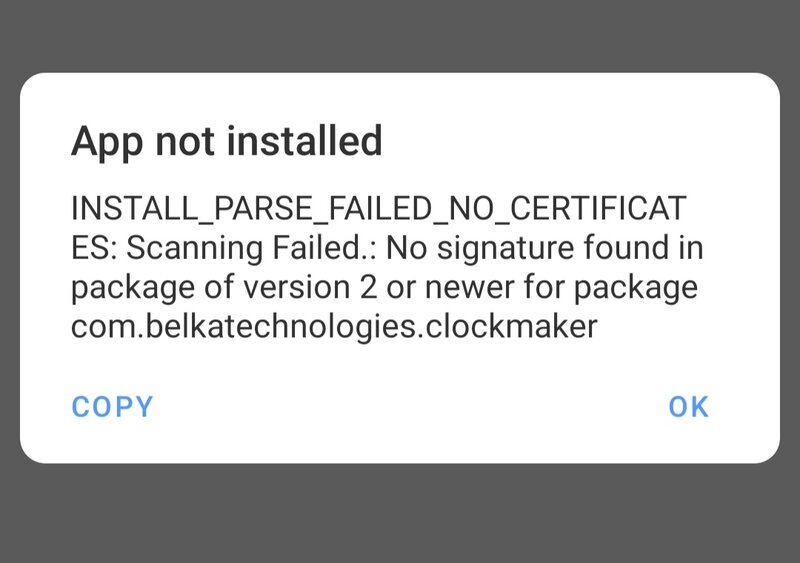
I've tried it with that very program. You can tell by the screenshots I've attached in this message. One is the first error I got, and the next is what showed after I selected "SHOW FULL ERROR". I also tried using LP, cuz I've had some luck there, but not with this one, I'm afraid to say.
 

Attachments

Marialisa

LP Mod Queen ? From Sbennytopia ??
Member for 6 years
I've tried it with that very program. You can tell by the screenshots I've attached in this message. One is the first error I got, and the next is what showed after I selected "SHOW FULL ERROR". I also tried using LP, cuz I've had some luck there, but not with this one, I'm afraid to say.
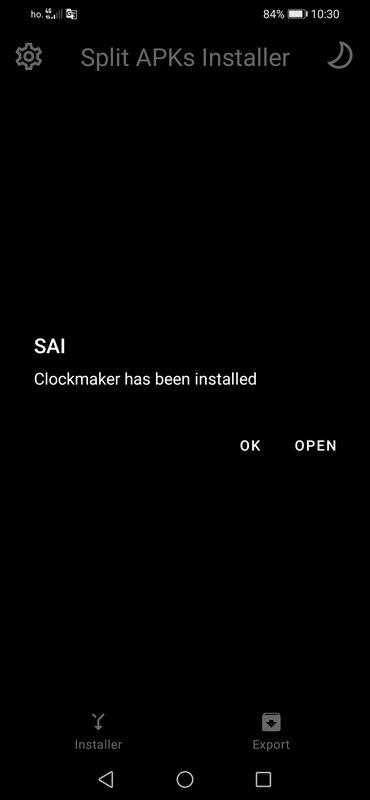
Delete all both the game and the file manager folder where the game is located, and then download the game again, let me know thanks! I always answer and I am always ready to help those who have problems, but there are those who do not, so please wait for your response thanks! I downloaded the game without any problems see my photo
 

Attachments

Last edited:

DarthVoda

Savage Lv6️⃣
Member for 8 years
Delete all both the game and the file manager folder where the game is located, and then download the game again, let me know thanks! I always answer and I am always ready to help those who have problems, but there are those who do not, so please wait for your response thanks! I downloaded the game without any problems see my photo
Ok, will try that now, and I'll report back with the result shortly.

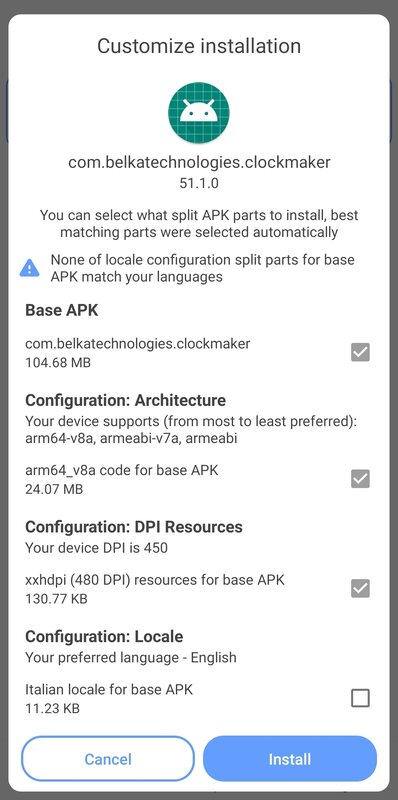
Edit: Alas!! I hope you know that nothing would please me more than to let you know I was successful. Yet, I am met with the same error messages after completely deleting any semblance of the game as well as the mod file, which I re downloaded and tried to install fresh, as suggested. I don't know why this is happening, because I've definitely 8nstalled this very mod of yours earlier, multiple times last year that I can recall. Maybe it's something to do with this device (which is a replacement that I had procured just a month or so ago). Another thing that struck me as odd was the checklist of individual items that comprise the split apk file, which is shown during the installation process. This is a new(ish) feature for Split APK Installer, and it.looks like the image I've attached, below. Notice one box at the bottom is unticked by default. Now, I've tried both leaving it unchecked as it shows here, and checking it after that failed. Both attempts leave me baffled and a little sad that I can't continue playing this modded game, which I was enjoying very much until recently.
 

Attachments

Last edited:

Marialisa

LP Mod Queen ? From Sbennytopia ??
Member for 6 years
Ok, will try that now, and I'll report back with the result shortly.

Edit: Alas!! I hope you know that nothing would please me more than to let you know I was successful. Yet, I am met with the same error messages after completely deleting any semblance of the game as well as the mod file, which I re downloaded and tried to install fresh, as suggested. I don't know why this is happening, because I've definitely 8nstalled this very mod of yours earlier, multiple times last year that I can recall. Maybe it's something to do with this device (which is a replacement that I had procured just a month or so ago). Another thing that struck me as odd was the checklist of individual items that comprise the split apk file, which is shown during the installation process. This is a new(ish) feature for Split APK Installer, and it.looks like the image I've attached, below. Notice one box at the bottom is unticked by default. Now, I've tried both leaving it unchecked as it shows here, and checking it after that failed. Both attempts leave me baffled and a little sad that I can't continue playing this modded game, which I was enjoying very much until recently.
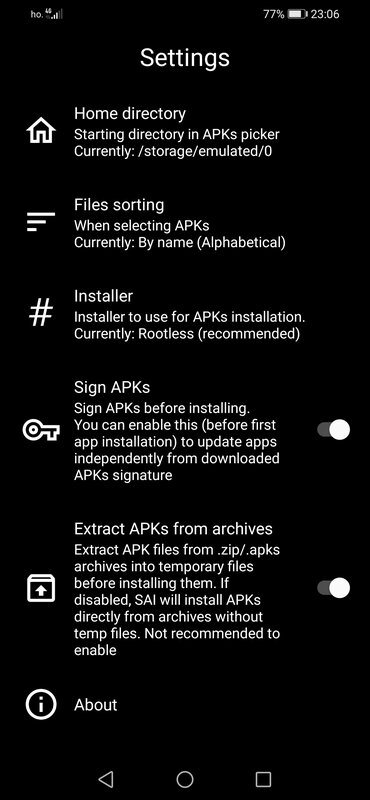
I don't know why this happens to you! Nobody complained! Now I show you the settings of my Sai apks installer
 

Attachments

Marialisa

LP Mod Queen ? From Sbennytopia ??
Member for 6 years
Ok, will try that now, and I'll report back with the result shortly.

Edit: Alas!! I hope you know that nothing would please me more than to let you know I was successful. Yet, I am met with the same error messages after completely deleting any semblance of the game as well as the mod file, which I re downloaded and tried to install fresh, as suggested. I don't know why this is happening, because I've definitely 8nstalled this very mod of yours earlier, multiple times last year that I can recall. Maybe it's something to do with this device (which is a replacement that I had procured just a month or so ago). Another thing that struck me as odd was the checklist of individual items that comprise the split apk file, which is shown during the installation process. This is a new(ish) feature for Split APK Installer, and it.looks like the image I've attached, below. Notice one box at the bottom is unticked by default. Now, I've tried both leaving it unchecked as it shows here, and checking it after that failed. Both attempts leave me baffled and a little sad that I can't continue playing this modded game, which I was enjoying very much until recently.
Your last image is not from Sai apks installer, you have to install it with Sai not with phone installation package!
 

Marialisa

LP Mod Queen ? From Sbennytopia ??
Member for 6 years
Much to my chagrin, I am unable to install this mod. When trying to install an error message appears, saying that it can't be installed "Yada, Yada, Yada, Yada". Here's the message as it appears on my phone:

App not installed
INSTALL_PARSE_FAILED_NO_CERTIFICAT
ES: Scanning Failed.: No signature found in
package of version 2 or newer for package
com.belkatechnologies.clockmaker
this, you need to install the "Split APK Installer " App on your phone. Then, open it, tap on"Install APKs" and select the downloaded file in order to install it. If the app doesn't install for some reason, open the settings at the top-left of Split APKS Installer and enable the "Sign APK" option and then try again.
 

DarthVoda

Savage Lv6️⃣
Member for 8 years
I really appreciate you trying all you can to help me, but I'm concerned I might just be totally helpless, in this regard, lol! I tried everything you suggested before, but had not changed any settings in the SAI. So I tried what you suggested and toggled the Sign APK feature -- and got the same result. Just for shits and giggles, I also tried toggling Pro Mode off (as it said it might cause problems when enabled), both with the Sign APK on and off, and both attempts met me with the exact same error message. I am as stumped as you may be, as to what the problem is. Like I mentioned, I've enjoyed your mods for months on end without major issues like this. Coincidentally (I'm sure), I've also run into another mod of yours that doesn't seem to work for me: Sea Merge. I left a comment in that thread. My trials and tribulations aren't only from your mods, either, as I've recently run into a mod from the great Sbenny himself, whose work is impeccable by any standard, which just won't work for me, on this phone. I seriously wondering if the device itself is maybe the cause of these recent problems. That seems to be the only variable that isn't constant, in this sad equation.
 

Marialisa

LP Mod Queen ? From Sbennytopia ??
Member for 6 years
I really appreciate you trying all you can to help me, but I'm concerned I might just be totally helpless, in this regard, lol! I tried everything you suggested before, but had not changed any settings in the SAI. So I tried what you suggested and toggled the Sign APK feature -- and got the same result. Just for shits and giggles, I also tried toggling Pro Mode off (as it said it might cause problems when enabled), both with the Sign APK on and off, and both attempts met me with the exact same error message. I am as stumped as you may be, as to what the problem is. Like I mentioned, I've enjoyed your mods for months on end without major issues like this. Coincidentally (I'm sure), I've also run into another mod of yours that doesn't seem to work for me: Sea Merge. I left a comment in that thread. My trials and tribulations aren't only from your mods, either, as I've recently run into a mod from the great Sbenny himself, whose work is impeccable by any standard, which just won't work for me, on this phone. I seriously wondering if the device itself is maybe the cause of these recent problems. That seems to be the only variable that isn't constant, in this sad equation.
I am very sorry for sure it's your phone, but I can still help you, I can change the apks game to apk so you can download it safely , I don't know what problems you had with the Sea Merge the other day, but we can fix that too
 
Last edited:

MattJones

Hardcore Lv9️⃣
Member for 9 years
All seems to be working great. No problems my end.
 

DarthVoda

Savage Lv6️⃣
Member for 8 years
I'm down to try another apk file, to see if that works. Like I just posted in the other thread, I'm sporting a Samsung Note 20 5G (not ultra), purchased unlocked directly from Samsung, with Sprint/T-Mobile for carrier, and running Android 11 with Samsung's One UI ver. 3.0.. Thanks again for your relentless and generous assistance, hope it works this time, lol!!

Also, I'm flummoxed as to your admonishing me about using SAI. That is all I ever use (occasionally I'll try LP, but mainly it's SAI) whenever installing split apks. I may not be as adept as you, but I can at least tell the difference between the two, lol! The last image I had posted above was the first pop up that shows once I've selected the .apks file I wish to install, within SAI. No such "Customized Installation" screen has ever showed up, when I use the regular package installer. Do you not get a similar screen when you select an .apks file to install,using SAI? It only displays when I try it with Pro-mode enabled. But, like I already explained, I'm getting the same error message regardless of Pro-mode or Sign apk enabled and disabled...
 
Last edited:

Marialisa

LP Mod Queen ? From Sbennytopia ??
Member for 6 years
I'm down to try another apk file, to see if that works. Like I just posted in the other thread, I'm sporting a Samsung Note 20 5G (not ultra), purchased unlocked directly from Samsung, with Sprint/T-Mobile for carrier, and running Android 11 with Samsung's One UI ver. 3.0.. Thanks again for your relentless and generous assistance, hope it works this time, lol!!

Also, I'm flummoxed as to your admonishing me about using SAI. That is all I ever use (occasionally I'll try LP, but mainly it's SAI) whenever installing split apks. I may not be as adept as you, but I can at least tell the difference between the two, lol! The last image I had posted above was the first pop up that shows once I've selected the .apks file I wish to install, within SAI. No such "Customized Installation" screen has ever showed up, when I use the regular package installer. Do you not get a similar screen when you select an .apks file to install,using SAI? It only displays when I try it with Pro-mode enabled. But, like I already explained, I'm getting the same error message regardless of Pro-mode or Sign apk enabled and disabled...
If the apk file works for you I do the mod again and replace Apks in Apk, before changing the file I wait for your answer
 

DarthVoda

Savage Lv6️⃣
Member for 8 years
Honestly, I'd feel bad just for wasting your time iif it turns out to be fruitless. As I said earlier, yes, .apk files installed on my smartphone just fine, smooth as ice, lol!! Consider that and rhe bewildering fact that these latest mods are the only ones exhibiting this odd behavior (there's actually another I've discovered, which I shall leave a message for in the appropriate thread, but it's titled 2-2-4-8 LINKED!), and I am concerned that even changing them to regular .apk from the split .apks might not have any positive outcome I really am tremendously grateful for your help, thus far, and I know your time is valuable, so only if you've got the time to spare and the inclination (which is apparent that you possess the inclination, lol!l), then go ahead and change it up and I'll give it a whirl. I can tell you that I am involved in nothing today, and have been so involved for far too long:; I'm actually thinking about taking a solo trip somewhere like Yosemite Forest or the Las Vegas Strip, just to break up my monotonous life for a few days, lol!!).
 
Last edited:

Marialisa

LP Mod Queen ? From Sbennytopia ??
Member for 6 years
Honestly, I'd feel bad just for wasting your time iif it turns out to be fruitless. As I said earlier, yes, .apk files installed on my smartphone just fine, smooth as ice, lol!! Consider that and rhe bewildering fact that these latest mods are the only ones exhibiting this odd behavior (there's actually another I've discovered, which I shall leave a message for in the appropriate thread, but it's titled 2-2-4-8 LINKED!), and I am concerned that even changing them to regular .apk from the split .apks might not have any positive outcome I really am tremendously grateful for your help, thus far, and I know your time is valuable, so only if you've got the time to spare and the inclination (which is apparent that you possess the inclination, lol!l), then go ahead and change it up and I'll give it a whirl. I can tell you that I am involved in nothing today, and have been so involved for far too long:; I'm actually thinking about taking a solo trip somewhere like Yosemite Forest or the Las Vegas Strip, just to break up my monotonous life for a few days, lol!!).
I updated the game is a new version, the file is in Apk surely you can download it safely, Since you paid for the game without being able to install it you pay nothing only 10 SB, now I load the game in the forum and I send you the link, please let me know thanks! if everything works well for you can you please change your vote? thank you very much 😁

 
Last edited:
Status
Not open for further replies.
The Cursed Castle - Online RPG on Google Play
Top