

 Trusted by over 1.6 million members since 2014 — why not join them?
- Gender
- Not specified
- Device
- 6502
- Country
- Canada

Diabaig
v1.0.1MOD Features How to install
Download Link (how to download?)
-
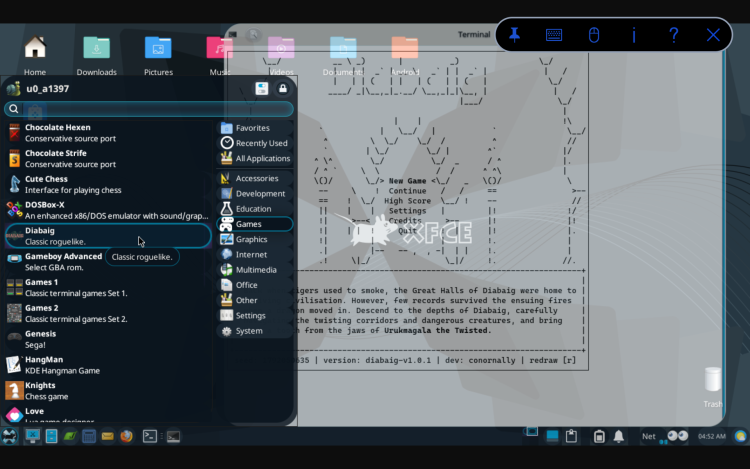
Back when tigers used to smoke, the Great Halls of Diabaig were home to a thriving civilisation. However, few records survived the ensuing fires when a dragon moved in. Descend to the depths of Diabaig, carefully navigate the twisting corridors and dangerous creatures and return with a tooth from the dragon's jaws.
Overview
Diabaig is a traditional turn-based ASCII roguelike where you are never more than a few mistakes away from death. Choose a starting class, find powerful items, and learn new spells and techniques to face increasingly dangerous adversity. You will discover many floors with rooms filled with unique creatures, magic scrolls, unknown potions and mighty weapons. Use everything at your disposal to survive as long as possible and defeat the dragon, but remember to keep enough spare for the return journey.
Basic Controls
Move and attack with arrows/NUMPAD/hjkl (diagonals "yubn")
(e) Eat food
(r) Read scroll
(d) Drink potion
(t) Throw item
(f) Fire bow
(w) Weild weapon/armour/ring
(a) Apply a potion to your weapon
(s) Search your environment
(1,2,3) Cast spell
(i) Show inventory
(>,<) Descend or Ascend stairway
For a full explanation of all commands, tips and stats, press (?)
CPU Architecture: arm64-v8a
You can play and install this app without root permissions.
You can play this game even without any Internet Connection.
Load Additional Info
This is a new 2025/2026 game for Termux.
It has been compiled for the Android version, not the Windows or Mac version.
I have included the GUI/Desktop files.
Download to the Android/Download folder.
From the Desktop, open the Android folder and double click Diabaig-Android-Termux-Roguelike.tar.gz and when opened select extract. The game should now appear in the menu/Games listing.
Or, manually install.
From within Termux command-line,
FYICode:tar -zxf /sdcard/Download/Diabaig-Android-Termux-Roguelike.tar.gz
The archives files should automatically install into the proper locations, however, should they require coaxing...
The Diabaig folder belongs in $HOME/Games folder.
Diabaig.sh belongs in $HOME/.scripts folder.
Diabaig.desktop belongs in /usr/shared/Applications folder.
• App not installing/saying not compatible and you're running Android 14? Then you may need to install and use VPhoneOS on your phone by clicking here or, if have a computer, visit this page from PC and click here. This should help you. If not, read this: how to install mod apk files on Android 14 or newer.
Before reading the installation instructions below, if you need help about how to use our website, please watch a simple video tutorial we created, about How to Download & Install apk files from sbenny.com by clicking here.
Download the desired APK file and tap on it to install it on your device. Make also sure to uninstall your game first if you have it installed!
• App not installing/saying not compatible and you're running Android 14? Then you need to install VPhoneOS on your phone by clicking here or, if have a computer, visit this page from PC and click here. Also, make sure you turned off "Play Protect" from the Google Play Store app, as it prevents installing mods. This should help you. If not, read this: how to install mod apk files on Android 14 or newer.
If you need help about how to use our website, please watch this simple video tutorial below about How to Download & Install apk files from sbenny.com.
 No videos yet. If you would like to thank Snailsoft and gain some extra SB Points, record your gameplay and share it here.
Code:https://github.com/conornally/diabaig


