Trusted by over 1.6 million members since 2014 — why not join them?
- Gender
- Male
- Device
- OnePlus One ~ 10 Pro
- Country
- Greece
Glextor Manager & Organizer
5.35.2.515MOD Features How to install
Download Link (how to download?)
-
It is a better alternative to Android default application drawer. It will help you to manage with hundreds of applications. It is one of the best and full-featured app manager and organizer for Android!
App organizer
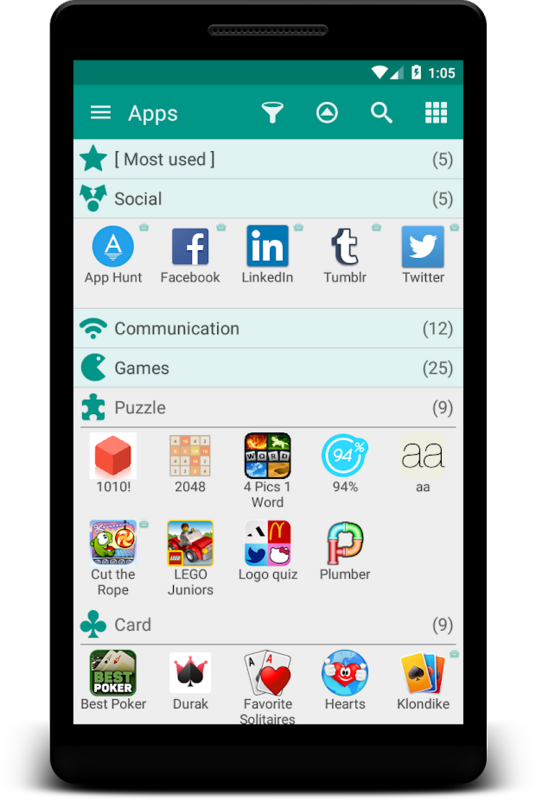
Organize your applications with autogrouping to folders feature which is based on Google Play categories. Newly installed applications can be categorized automatically. If you want to get more personalized structure, create your own folders or just rename predefined ones. It is possible to assign each application to several groups at the same time according to your needs. Use system folders to get quick access to most used, last used, or last installed apps.
Rooted devices support
Use root tools for batch operations to install/uninstall apps fast and easily, uninstall system applications.
Favorites
Mark applications as favorites to find them easily. Your favorite apps are always placed at the beginning when app list is sorted by name. Use filters to see only favorites. Use system group Favorites to access all your favorite applications inside one folder.
Backup & restore
With your own repository you don’t need to reinstall all your software and games from Market each time you upgrade your OS or configure new Android device. Backup APK files to SD card or just save Market links by adding applications to the repository to get quick access to your favorite apps for installation. Customize backup settings according to your needs. New version of your favorite software is awful? Restore one of the previous versions backuped by Glextor AppManager.
Group shortcuts & widgets
Now you don’t need to have dozens of shortcuts on your desktop. Use group desktop shortcuts and widgets to put your desktop in order.
...and more
• Interface customization
• Configuration export
• Manage installed apps
• Hide unused apps
• Share your favorite apps with your friends instantly (Facebook, Twitter, SMS, email, etc.)
• Use search and filters to find needed apps quickly
Full version features:
★ Ability to add subfolders to top folders
★ Root tools (batch operations of install/uninstall apps faster and easier, uninstalling system applications)
★ Backup history (multiple backups per app)
★ Automatic update of app backups when new version is installed
★ Ability to hide as many apps as you need (Free version allows to hide up to 3 apps)
★ Ability to hide social panel from drawer
★ System groups customization (Free version allows to show up to 5 items only inside System folder)
★ Context menu customization
★ Transparency customization for desktop group popup
★ Automatic applying icon packs to all applications
★ Ability to reconfigure widgets
★ Absence of an advertisement block
Note: This app uses Accessibility services.
If you are interested in helping us to translate this app to your native language, please let us know. Thank you in advance!
More screenshots and release notes: Glextor AppManager for Android
Stay connected!
Facebook: Glextor Inc.
Twitter: http://twitter.com/GlextorInc
Email: glextor@gmail.com
No: you can play and install this app without root permissions.
No: you can play this game even without any Internet Connection.
Load Additional Info
License-Removed
• App not installing/saying not compatible and you're running Android 14? Then you may need to install and use VPhoneOS on your phone by clicking here or, if have a computer, visit this page from PC and click here. This should help you. If not, read this: how to install mod apk files on Android 14 or newer.
Before reading the installation instructions below, if you need help about how to use our website, please watch a simple video tutorial we created, about How to Download & Install apk files from sbenny.com by clicking here.
Download the desired APK file below and tap on it to install it on your device.
• App not installing/saying not compatible and you're running Android 14? Then you need to install VPhoneOS on your phone by clicking here or, if have a computer, visit this page from PC and click here. Also, make sure you turned off "Play Protect" from the Google Play Store app, as it prevents installing mods. This should help you. If not, read this: how to install mod apk files on Android 14 or newer.
If you need help about how to use our website, please watch this simple video tutorial below about How to Download & Install apk files from sbenny.com.
 No videos yet. If you would like to thank KSCT and gain some extra SB Cash, record your gameplay and share it here.
Code:https://play.google.com/store/apps/details?id=com.glextor.appmanager.paid