

 Trusted by over 1.6 million members since 2014 — why not join them?
- Gender
- Male
- Device
- OnePlus One ~ 10 Pro
- Country
- Greece
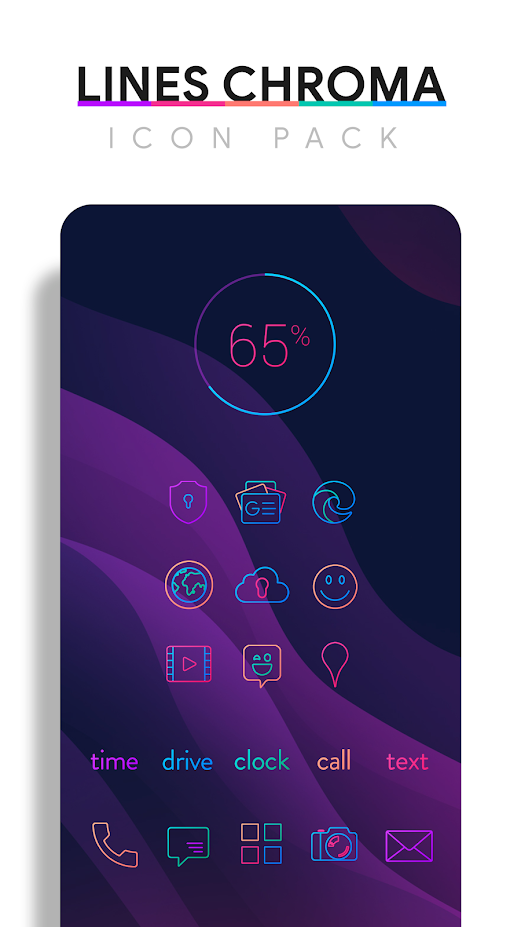

Lines Chroma Icon Pack
v3.9.4MOD Features How to install
Download Link (how to download?)
-
Lines Chroma is a colorful icon pack featuring simple and minimalistic line icons that use 5 carefully selected hues to provide a nice and consistent color palette. Color your screen with simple and clean icons. Included with Craft Line Icons are matching wallpapers and widgets for clocks, battery, and weather. Widgets offer color, size, and font customization, and over 200 handpicked custom wallpapers are included.
QUICK TIPS
You can manually change icons in most launchers by long-pressing the icon you want to change.
Widgets: If your widget stops updating, check your system or battery settings to make sure the app is free from battery optimization. More information at Don’t kill my app!
DISCLAIMER
You may need a third-party launcher to apply the icon pack.
FEATURES
• Over 4500 handcrafted colorful, simple and flat HD flat line icons with many variations of default icons such as phone, contacts, camera, etc.
• Over 300 custom wallpapers. Wallpapers include abstract designs and illustrations, theme-inspired 3D renderings, and landscape photographs. Lines Chroma - Icon Pack APK is the best possible choice for those looking for Personalization apps. All wallpapers shown are included!
• XXXHDPI high definition colorful icons included for super large HD screens. Being a hacked app, you might think Lines Chroma - Icon Pack is very hard to install or unsafe, but it's not! Lines Chroma - Icon Pack APK is very easy to install and if you face issues, just reply below and I'll help you. All icons are 288x288
• Parts of the flat icons are transparent, allowing each to display the provided sky/landscape backgrounds or their own backgrounds
• Wallpaper picker is installed
• Request icons via the "Request" tab
• Clean icons match any background, but work best with minimalist light/dark backgrounds.
• Muzei support for rotating wallpapers
• New icons added regularly
WIDGETS
System widgets are included as well as editable KWGT widgets.
• Battery Widgets
• Digital clock widgets
• Analog clock widget
• Weather widget
HEXAGONAL COLOR CODES
Red: #eb3488
Purple: #8751a1
Orange: #f48075
Green: #24b89d
Blue: #4186c6
HOW TO APPLY ICONS VIA ICON PACK
1. Open the app after installation
2. Go to the "Apply" tab
3. Select your launcher
HOW TO APPLY ICONS VIA THE LAUNCHER
1. Open launcher settings by pressing + hold an empty area on the home screen
2. Select customization options
3. Select icon pack
Ready to play? Download now Lines Chroma - Icon Pack APK for free, only at Sbenny.com!
CPU Architecture: armeabi-v7a & arm64-v8a
No: you can play and install this app without root permissions.
Yes: you need an active Internet Connection to use this app.
Load Additional Info
License Removed!
• App not installing/saying not compatible and you're running Android 14? Then you may need to install and use VPhoneOS on your phone by clicking here or, if have a computer, visit this page from PC and click here. This should help you. If not, read this: how to install mod apk files on Android 14 or newer.
Before reading the installation instructions below, if you need help about how to use our website, please watch a simple video tutorial we created, about How to Download & Install apk files from sbenny.com by clicking here.
Download the desired APK file below and tap on it to install it on your device.
• App not installing/saying not compatible and you're running Android 14? Then you need to install VPhoneOS on your phone by clicking here or, if have a computer, visit this page from PC and click here. Also, make sure you turned off "Play Protect" from the Google Play Store app, as it prevents installing mods. This should help you. If not, read this: how to install mod apk files on Android 14 or newer.
If you need help about how to use our website, please watch this simple video tutorial below about How to Download & Install apk files from sbenny.com.
 No videos yet. If you would like to thank KSCT and gain some extra SB Points, record your gameplay and share it here.
Code:https://play.google.com/store/apps/details?id=com.natewren.lineschroma


