

 Trusted by over 1.6 million members since 2014 — why not join them?
- Gender
- Female
- Device
- Google Pixel 3a - Android 12
- Country
- Italy
My Hospital: Build and Manage v1.1.90
MOD Features How to install
Download Link (how to download?)
Download FileSince you're viewing the AMP-accelerated version of our website which doesn't store login cookies, please scroll to the bottom of this page and click on the "View Non-AMP Version" button first, thanks!
- Cure your way through the quirkiest and funniest diseases in My Hospital - the ultimate simulation game where you design, manage and maintain your very own medical centre!
Create elixirs, farm and harvest your own medical plants and produce cures for hundreds of patients that need your help. It’s a world where Panacea rules and every treatment is available at your fingertips!
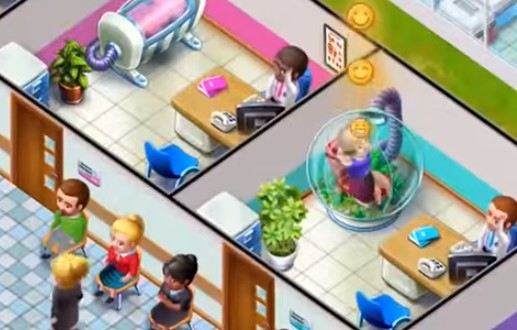
Construct and manage your own hospital. Build doctor’s offices, diagnostic rooms, the treatment centre and laboratories. Expand and upgrade your hospital and share it with friends!
Farm and harvest plants with healing properties, produce dozens of elixirs, and blend syrups to treat more than 80 funny diseases. Whether it’s a chilli throat condition, frozen hands or slimey lungs, you’ll be sure to find the cure! Unlock new remedies, treatment rooms and new conditions with every level and complete fun challenges! Download now the MOD APK of My Hospital: Build and Manage for free, only at sbenny.com!
You can play and install this app without root permissions.
You can play this game even without any Internet Connection.Load Additional Info
- Unlimited Coins (increase instead of decreasing)
- Unlimited Hearts (increase instead of decreasing)
• App not installing/saying not compatible and you're running Android 14? Then you may need to install and use VPhoneOS on your phone by clicking here or, if have a computer, visit this page from PC and click here. This should help you. If not, read this: how to install mod apk files on Android 14 or newer.
Before reading the installation instructions below, if you need help about how to use our website, please watch a simple video tutorial we created, about How to Download & Install apk files from sbenny.com by clicking here.
Download the desired APK file and tap on it to install it on your device. Make also sure to uninstall your game first if you have it installed!
• App not installing/saying not compatible and you're running Android 14? Then you need to install VPhoneOS on your phone by clicking here or, if have a computer, visit this page from PC and click here. Also, make sure you turned off "Play Protect" from the Google Play Store app, as it prevents installing mods. This should help you. If not, read this: how to install mod apk files on Android 14 or newer.
If you need help about how to use our website, please watch this simple video tutorial below about How to Download & Install apk files from sbenny.com.
Code:https://play.google.com/store/apps/details?id=com.cherrypickgames.myhospital


