Free Mod apk 🤖☠ Termux Plus 3 v2025.12.08 for Android 15 up.

Trusted by over 1.6 million members since 2014 — why not join them?
Log in or Register to join us!

Feedbacks


  • Total voters
    3
  • This poll will close: .

Snailsoft

∞ and beyond!
Staff Member
Moderator
SB Mod Squad ⭐
✔ Approved Releaser
Active User
Member for 2 years
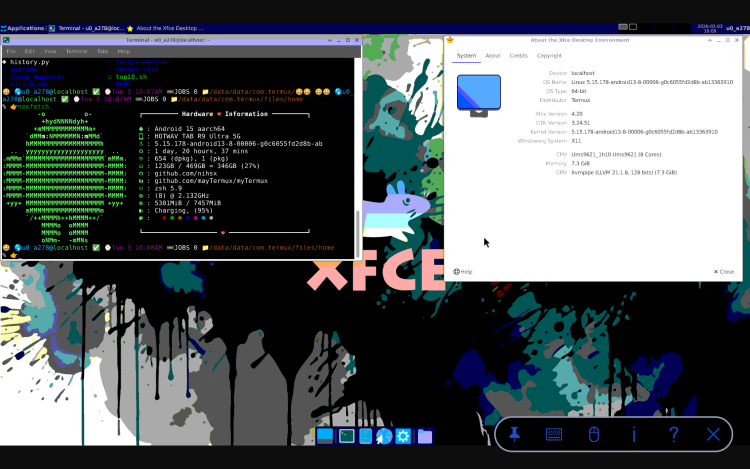
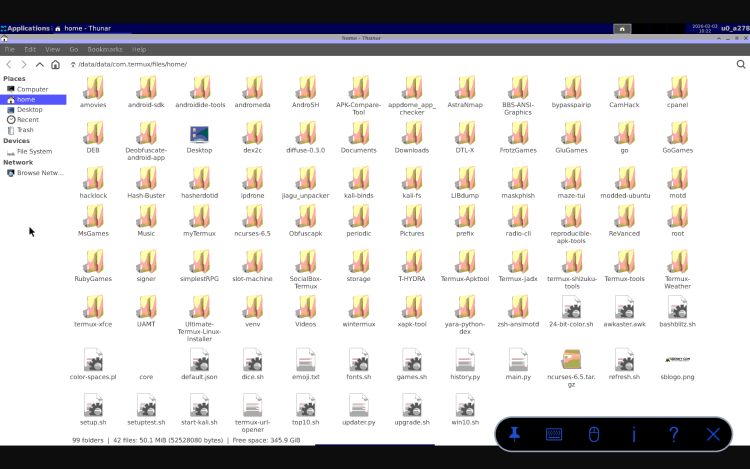
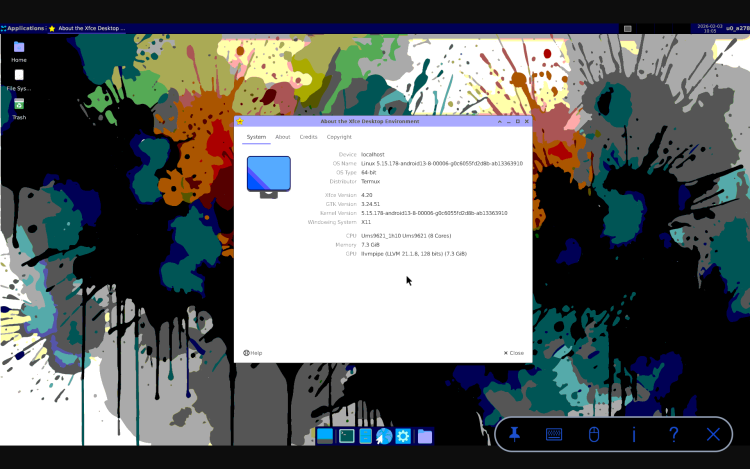
For the sceptic who wrote me to complain about TermUx only supporting CLI and being incapable of running GUI...
Debian running XFCE X11.

Screenshot_20260203-100516.png Screenshot_20260203-100906.png Screenshot_20260203-102258.png Screenshot_20260203-110340.png
 

Snailsoft

∞ and beyond!
Staff Member
Moderator
SB Mod Squad ⭐
✔ Approved Releaser
Active User
Member for 2 years

Snailsoft

∞ and beyond!
Staff Member
Moderator
SB Mod Squad ⭐
✔ Approved Releaser
Active User
Member for 2 years
Although not Android specific, I recently used Termux to recover a Windows 11 laptop with forgotten password.

I know the person and the computer so I was not concerned about the device being stolen.

First, start the computer and find the name on the login.
Let's call it Karls
Shut down the computer and connect it to your Android 13 or higher device using a double ended male USB-C cable.

Identify the Windows Partition: Use the following command to list the available partitions:
Code:
fdisk -l
Depending on hardware you may need to manually mount the PC drive, usually SDA1-3
If the device didn't automatically identity and mount a manual approach is required.
Mount the Windows Partition: Use the following command to mount the Windows partition, replacing /dev/sda1 with the actual partition name you identified.
Code:
mount /dev/sda1 /mnt/windows
cd /mnt/windows/Windows/System32/config
Once you know the account and drive you may proceed.
In Termux, Root and SUDO are not needed.

Install the tool:
Code:
apt install chntpw
242619.png

Chntpw, short for “Change NT Password,” is a powerful command-line utility designed to reset or modify Windows passwords. It operates directly on the Security Account Manager (SAM) database, where Windows stores user account information, including encrypted passwords. Because it works outside of the Windows environment, it bypasses the normal login procedures, making it an invaluable tool for regaining access to locked systems.

Unlike simply deleting user accounts, Chntpw allows you to remove existing passwords, unlock disabled accounts, and even promote standard users to administrators, all without needing the original password. This makes it a preferred solution over other, more destructive method.

Use:
chntpw -u Karls SAM

You should get a menu of options.
Select, 1, clear user password.

Next, press Q then Y and [enter] to quit the tool and save changes.

Exit Termux.
Remove the cable.
Start the PC.
The password should now be removed.

Although it is easier to do this using a bootable USB thumb drive containing Kali or Ubuntu and the same tool, this proves that a simple Android device with the proper tools and know-how can also be used.
 

Snailsoft

∞ and beyond!
Staff Member
Moderator
SB Mod Squad ⭐
✔ Approved Releaser
Active User
Member for 2 years
Termux RULEZ!
Improved the display and drivers.
True colour graphics.
243021.png


Obey the Penguin!

Tux, that is. Not Mr. Flibble. That would just be wrong - like Potato King crazy.
243023.jpg
 

Snailsoft

∞ and beyond!
Staff Member
Moderator
SB Mod Squad ⭐
✔ Approved Releaser
Active User
Member for 2 years
If you haven't done so recently, there has been another major system upgrade and you should run the UPGRADE script.

255955.png
 

Snailsoft

∞ and beyond!
Staff Member
Moderator
SB Mod Squad ⭐
✔ Approved Releaser
Active User
Member for 2 years
For X11 Debian GUI users of Termux, I have improved upon the automation.
This was tricky due to priority and sequence of the script as well as adapting Arch format.

With this updated script for .zshrc Pulse Audio drivers are properly loaded, the VNC startx sequence automatically kills and cleans up old instances and starts a new clean one, and, the environment paths are better organized.

Code:
export ZSH=$HOME/.oh-my-zsh
ZSH_THEME="ma"
plugins=(
  git 
  zsh-autosuggestions 
  zsh-syntax-highlighting 
  bgnotify
  zsh-fzf-history-search
  zsh-autocomplete
)

PATH="$PREFIX/bin:$HOME/.local/bin:$PATH"
export PATH

LINK="https://github.com/mayTermux"
export LINK

LINK_SSH="git@github.com:mayTermux"
export LINK_SSH

export TERM=xterm-256color 

source $ZSH/oh-my-zsh.sh
source $HOME/.config/lf/icons

# Prediction List View
#zstyle ':autocomplete:*' default-context history-incremental-search-backward
#zstyle ':autocomplete:history-incremental-search-backward:*' min-input 1

source $HOME/.aliases
source $HOME/.autostart
export HISTCONTROL=ignoreboth
termux-wake-lock

# LearnTermux.tech
# https://github.com/khansaad1275/

# declares an array with the emojis we want to support
EMOJIS=(😺 😸 😹 😻 😼 😽 🙀 😿 😾 😍 🍕 🍔 🍟 🌭 🌯 🥗 🍗 🍖 😎 🤐 🤑 🤯 🤬 🤓 👹 💀 👽 👾 🤖 👤 👓 💻 🦁 🐯 🧠 🦾 🎈 🎉 🎊 🎁 🎢 🥽 🧥 🛒 🧢 👑 ⚽ 💍 💎 🎮 🔊 🎵 🔒 🔐 🛹 🦼 🚕 🚄 🚇 🚂)

# function that selects and return a random element from the EMOJIS set
RANDOM_EMOJI() {
  SELECTED_EMOJI=${EMOJIS[$RANDOM % ${#EMOJIS[@]}]};
  echo $SELECTED_EMOJI;
}

# declare the terminal prompt format
export PS1='$(RANDOM_EMOJI) ~ $ '
export NEWLINE=$'
'
export PS1='$(RANDOM_EMOJI) 🌎%{$(tput setaf 39)%}%n%{$(tput setaf 81)%}@%{$(tput setaf 77)%}%m %(?.%F{green}✅.%F{red}?%?)%f ⌚%F{magenta}%w %@%f 🚥JOBS %j 📁%F{yellow}%d%f ${NEWLINE}%# 👉'
export PATH=$PATH:$(go env GOPATH)/bin
export PATH=~/.termux-xfce/:/data/data/com.termux/files/usr/bin:/data/data/com.termux/files/home/.local/bin:/data/data/com.termux/files/usr/bin:/product/bin:/apex/com.android.runtime/bin:/apex/com.android.art/bin:/system_ext/bin:/system/bin:/system/xbin:/odm/bin:/vendor/bin:/vendor/xbin:/data/data/com.termux/files/usr/bin/texlive
$HOME/gui.sh

sl
clear
echo PLEASE WAIT...
toilet -f standard -F gay SNAILSOFT
neofetch
echo TERMUX PLUS v3.0 EXCLUSIVELY AT SBENNY.COM
echo Installed Wed Dec 10 03:21:41 CST 2025
echo SU available by entering: root
echo SDcard mounted at /sdcard/Download/
echo "APK modding tools: APKiD, APKsigner, RK-PairIP, APKtools, APKeditor, DEX2C, DTLX, Ubuntu, Kali, W3M Browser" | cowsay -f tux
espeak "X clue siv-lee at ess Benny dot comm."
ls
pulseaudio --start --load="module-native-protocol-tcp auth-ip-acl=127.0.0.1 auth-anonymous=1" --exit-idle-time=-1
The setup.sh script in the first post is also updated for fresh install.
Setup.sh will also generate the new gui.sh file required by .zshrc

If you are manually updating -
Code:
cd $HOME
echo stopvnc > gui.sh
echo startvnc >> gui.sh

chmod +x gui.sh
 

Snailsoft

∞ and beyond!
Staff Member
Moderator
SB Mod Squad ⭐
✔ Approved Releaser
Active User
Member for 2 years
Termux has been stuck on Python 3.12 for years even though 3.16 is being beta tested for other systems.
While not thee latest, an upgrade is finally available!

Code:
#----------------------------------------------------
#Python upgrade

cd $HOME
yes | apt update && apt upgrade
clear 
figlet PYTHON

wget https://public.8018985.xyz/python314_3.14.3_aarch64.deb
apt install ./python*.deb
apt -f install
python3.14 -m ensurepip
python3.14 --version

#----------------------------------------------------
 

Snailsoft

∞ and beyond!
Staff Member
Moderator
SB Mod Squad ⭐
✔ Approved Releaser
Active User
Member for 2 years
Python can be tedious and difficult to update its packages.
An old tool that automates the process has now been ported to Termux.

Code:
pip install pip-review
To use it
Code:
pip-review --interactive
Or, for automatic updates and continue after an error

Code:
pip-review -aC
 

Snailsoft

∞ and beyond!
Staff Member
Moderator
SB Mod Squad ⭐
✔ Approved Releaser
Active User
Member for 2 years
Although I have proven that I can run Ghidra on Android, it is painfully slow.
A group of developers who also wanted to use the disassembler natively have recently ported the Python version to Termux.
It wasn't easy figuring out what was required or the sequence as it relies on Rust and Python neither handling dependencies well.
After many hours, I'm glad to say I can now share this with you 😀

Make sure your Python packages are up-to-date.
Code:
pip install pip-review
pip-review -aC
Code:
yes | pkg install rust libzmq binutils-bin binutils-is-llvm cargo-c binutils

CARGO_BUILD_TARGET=aarch64-linux-android pip3 install maturin
pip install rich --upgrade
pip install tomli --upgrade
pip install ghidrecomp
pip3 install jupyter || true
pip3 install jupyter

ANDROID_API_LEVEL="$(getprop ro.build.version.sdk)" pip install semgrep
427895.png
 

Snailsoft

∞ and beyond!
Staff Member
Moderator
SB Mod Squad ⭐
✔ Approved Releaser
Active User
Member for 2 years
A significant issue has arose since updating Python to v3.14, ApkID no longer works 😱
This is due to its dependence on pip install yara-python, a package depreciated in v3.13.
For whatever the reason, Pypi has still not updated ApkID to v3.1.0

This creates a two version Python dependency, one for newer packages and one for legacy.
In Windows or Ubuntu this is handled by the OS, but in Termux and older Linux it's handled by environment variables.

Using pip3.14 install yara-python-dex resulted in numerous errors due to missing dependencies.

Installation is unfortunately a bit involved until a pull request is merged in a dependency. Here’s how you do it:

Code:
cd ~
export ANDROID_API_LEVEL="$(getprop ro.build.version.sdk)"
git clone --recursive https://github.com/VirusTotal/yara-python
cd yara-python
pip3.14 install setuptools
python3.14 setup.py build --enable-dex
python3.14 setup.py install

pip3.12 uninstall yara-python-dex

pip3.12 install wheel
pip3.12 wheel --wheel-dir=yara-python-dex git+https://github.com/MobSF/yara-python-dex.git
pip3.12 install --no-index --find-links=yara-python-dex yara-python-dex

pip uninstall apkid
pip install apkid
cd ~
pip-review -aC;
Without this patch to Yara, the dexlib1 detection rule will fail as will any rule relying on string sizes.

I will eventually move the API line into the startup so any package can pull the data without having to repeat it every time.

Having done the above once, any legacy python package should confine to work and the new packages should ignore the older ones.

The new version of ApkID is reported to remove the package dependency, however, until the update is released the point is moot.
Too, no doubt many other tools will want this as Termux has used Python 3.12 for years.
 

Snailsoft

∞ and beyond!
Staff Member
Moderator
SB Mod Squad ⭐
✔ Approved Releaser
Active User
Member for 2 years
Compiling an APK without the need for Android Studio.
A Linux project ported to Termux.
This will add SDK, FLUTTER, MAVEN, KOTLIN, GRADLE support. It is assumed you already used the setup.sh script and have JAVA and NDK installed.
Too, Flutter output requires the X11 GUI desktop.

Code:
#----------------------------------------------------

cd $HOME
figlet ANDROID STUDIO

apt --fix-broken install
yes | pkg install which xorgproto ninja ninja-build dart android-sdk maven
yes | pkg install chromium

wget https://github.com/mumumusuc/termux-flutter/releases/download/3.29.2/flutter_3.29.2_aarch64.deb
dpkg -i ./flutter_3.29.2_aarch64.deb

flutter config --android-sdk $PREFIX/opt/android-sdk
flutter config --no-analytics
flutter config --android-sdk /data/data/com.termux/files/usr/opt/android-sdk

mkdir -p $PREFIX/opt/Android/sdk/cmdline-tools
cd $PREFIX/opt/Android/sdk
wget https://dl.google.com/android/repository/commandlinetools-linux-10406996_latest.zip
unzip commandlinetools-linux-*.zip
cd ~
echo 'export ANDROID_HOME=/data/data/com.termux/files/usr/opt/android-sdk/platform-tools/adb' >> ~/.profile
echo 'export ANDROID_HOME=$PREFIX/opt/Android/sdk' >> ~/.profile
echo 'export PATH=$PATH:$ANDROID_HOME/cmdline-tools/bin' >> ~/.profile
echo 'export PATH=$PATH:$ANDROID_HOME/platform-tools' >> ~/.profile

echo 'export sdk_root=$PREFIX/opt/Android/sdk/cmdline-tools/bin' >> ~/.profile

source ~/.profile
echo source \~\/\.profile >> .zshrc

clang aarch64-linux-android21-clang --version

# (The Java–only parts of sdkmanager work fine on ARM; native tools like the bundled adb are x86-64 and will be skipped, but you only need them if you plan to push APKs via USB).

yes | sdkmanager "platform-tools" "build-tools;34.0.0" "platforms;android-34" --sdk_root=$PREFIX/opt/Android/sdk/cmdline-tools/bin

yes | pkg install aapt aapt2 dx apksigner

clear
flutter doctor -v

#----------------------------------------------------
Once finished, you should see something like this:
540832.png

Channel errors are normal as Termux isn't n expected Linux.
Android license check's are normal.
No Chrome.exe is normal as this isn't Windows.
Android Studio isn't required as this is CLI.
ADB missing is correct.

5 · Building a simple native “hello-lib”
Project skeleton ($HOME/hello):

hello/
├─ jni/
│ ├─ Android.mk
│ └─ hello.c
└─ AndroidManifest.xml
hello.c

#include <jni.h>
JNIEXPORT jstring JNICALL
Java_com_example_MainActivity_stringFromJNI(JNIEnv* env, jclass clazz) {
return (*env)->NewStringUTF(env, "Hello from Termux NDK!");
}
Android.mk

LOCAL_PATH := $(call my-dir)
include $(CLEAR_VARS)
LOCAL_MODULE := hello
LOCAL_SRC_FILES := hello.c
include $(BUILD_SHARED_LIBRARY)
2. Compile:

cd ~/hello
ndk-build NDK_PROJECT_PATH=. APP_BUILD_SCRIPT=./Android.mk \
APP_PLATFORM=android-24
This drops libs/arm64-v8a/libhello.so.

3. Package & sign – use aapt, dx, apksigner, or simply drive Gradle if you have a complete Java project. Detailed command-line flows are shown in the BuildAPKs and Technical-Bot guides.

6 · Typical build environment variables
Add these to ~/.profile (already covered above but summarised for scripts):

export ANDROID_NDK_HOME=$PREFIX/opt/android-ndk
export ANDROID_HOME=$PREFIX/opt/Android/sdk
export JAVA_HOME=$PREFIX/opt/openjdk
export PATH=$PATH:$ANDROID_NDK_HOME/toolchains/llvm/prebuilt/linux-aarch64/bin
export PATH=$PATH:$ANDROID_HOME/cmdline-tools/latest/bin:$ANDROID_HOME/platform-tools
7 · Using CMake + Ninja instead of ndk-build
CMake projects work the same as on desktop; just point -DCMAKE_TOOLCHAIN_FILE=$ANDROID_NDK_HOME/build/cmake/android.toolchain.cmake and choose ABI/API level. Google’s guide on “other build systems” applies unmodified[6].

8 · Limitations & tips
Only arm64 hosts are supported; 32-bit phones cannot run the LLVM toolchain.

Heavy Gradle builds are memory-hungry; keep swap enabled or use org.codeassist/AndroidIDE for editing and run Gradle only via CLI.

USB debugging has not been enabled as it is buggy and consumes another 2GB of storage. Instead, copy the APK to /sdcard and tap-install.

For reproducible builds, pin exact build-tools and NDK versions in environment variables or Gradle.

Done
You can now compile shared libraries with Clang, package them into an APK, sign, and install—all directly on your phone’s terminal.


=== EDIT APP PROPERTIES ===

Android SDK is installed at: /data/data/com.termux/files/usr/opt/android-sdk

1. Edit android/gradle.properties:
Add: android.aapt2FromMavenOverride=/data/data/com.termux/files/usr/opt/android-sdk/build-tools/36.1.0/aapt2

2. Edit android/local.properties:
Add:
sdk.dir=/data/data/com.termux/files/usr/opt/android-sdk
ndk.dir=/data/data/com.termux/files/usr/opt/android-sdk/ndk/29.0.14206865
cmake.dir=/data/data/com.termux/files/usr/opt/android-sdk/cmake/4.1.2

Note: No PATH or environment variables needed.

A simple Hello World example
540838.png
 

Snailsoft

∞ and beyond!
Staff Member
Moderator
SB Mod Squad ⭐
✔ Approved Releaser
Active User
Member for 2 years
Here are a few python updates.

Code:
cd ~

python3 -m venv .venv; source .venv/bin/activate

pip install maturin

pip install --upgrade setuptools

pkg in uv

pip install pep517
 

Snailsoft

∞ and beyond!
Staff Member
Moderator
SB Mod Squad ⭐
✔ Approved Releaser
Active User
Member for 2 years
Another major system upgrade.
Another broken Python.
For whatever the reason, Python was downgraded from 3.14 to 3.13 and again broke many tools

As with the above 3.12 to 3.14 patch, run this 3.13 to 3.14 patch.

Code:
cd ~
export ANDROID_API_LEVEL="$(getprop ro.build.version.sdk)"
git clone --recursive https://github.com/VirusTotal/yara-python
cd yara-python
pip3.14 install setuptools
python3.14 setup.py build --enable-dex
python3.14 setup.py install

pip3.13 uninstall yara-python-dex

pip3.13 install wheel
pip3.13 wheel --wheel-dir=yara-python-dex git+https://github.com/MobSF/yara-python-dex.git
pip3.13 install --no-index --find-links=yara-python-dex yara-python-dex

pip uninstall apkid
pip install apkid
cd ~
pip-review -aC;
 

Snailsoft

∞ and beyond!
Staff Member
Moderator
SB Mod Squad ⭐
✔ Approved Releaser
Active User
Member for 2 years
Updated
 
The Cursed Castle - Online RPG on Google Play
Top