Mod apk 🤖☠ Termux Plus 5.2 Desktop

Trusted icon Trusted by over 1.6 million members since 2014 — why not join them?
Log in or Register to join us!
  • Overall Rating 5.0
    Based on 3 reviews
  • ⭐⭐⭐ Not all features or none of them work. (0.0%) 0
  • ⏰ Yes but it's outdated. (0.0%) 0

∞ and beyond!
Staff Member
Moderator
SB Mod Squad ⭐
✔ Approved Releaser
Active User
Member for 2 years


Termux Plus

v5.2


MOD Features  How to install

Credits to: Snailsoft
Type of release: Paid

Download Link (how to download?)
Download FileSince you're viewing the AMP-accelerated version of our website which doesn't store login cookies, please scroll to the bottom of this page and click on the "View Non-AMP Version" button first, thanks!
Similar MODs you might like:


  • For first time visitors to Termux, it is a TERminal UniX platform for Android.
    Most people consider it to be a command-line only Linux tool.
    Some have done simple GUI.
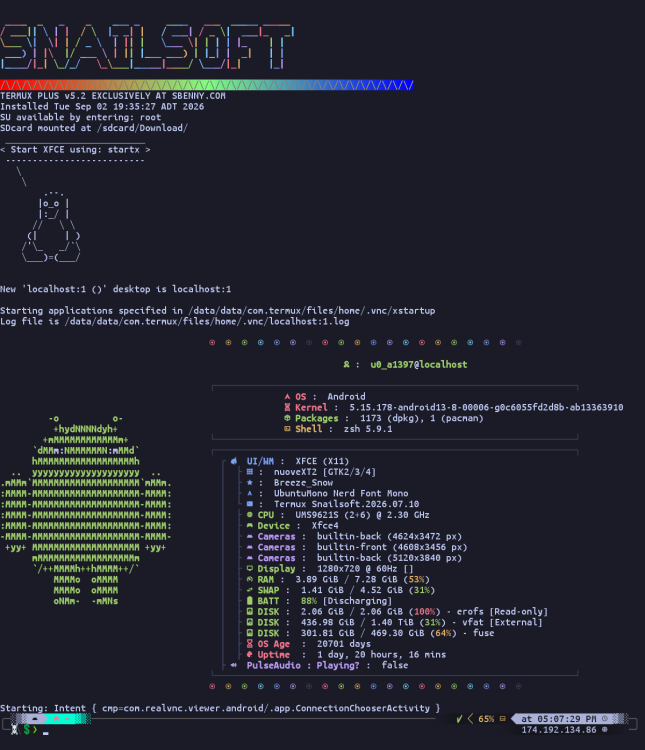
    I have pushed the limits to create a full desktop.
    Unlike previous releases, this is a single partition that contains the entire OS set up and ready to go.
    This avoids hassles with setup and for many gets around Geo blocked repositories.


  •   CPU Architecture: arm64-v8a

      
    No: you can play and install this app without root permissions.

      
    Yes: you need an active Internet Connection to use this app.

    Load Additional Info


  • Too many to list.
    For first time visitors to Termux, it is a TERminal UniX platform for Android.
    Most people consider it to be a command-line only Linux tool.
    Some have done simple GUI.
    I have pushed the limits to create a full desktop.

    Unlike previous releases, this is a single partition that contains the entire OS set up and ready to go. Install Termux, restore the partition, run the monitor. This is NOT Ubuntu or other higher level Linux, it is Termux.

    Click on the Video Tab for a preview of the new Termux OS.
    This has taken weeks of work.


    Over three thousand Debian packages, hundreds of Perl, Rust, Go, JAVA, and Python apps all modded to work together.
    This is a full OS and contains most of my Linux based Android modding tools.
    Win10 is now built in so no separate download is required.
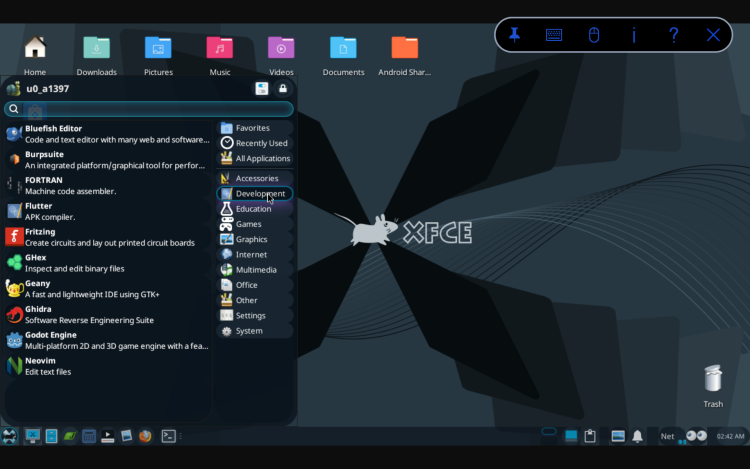
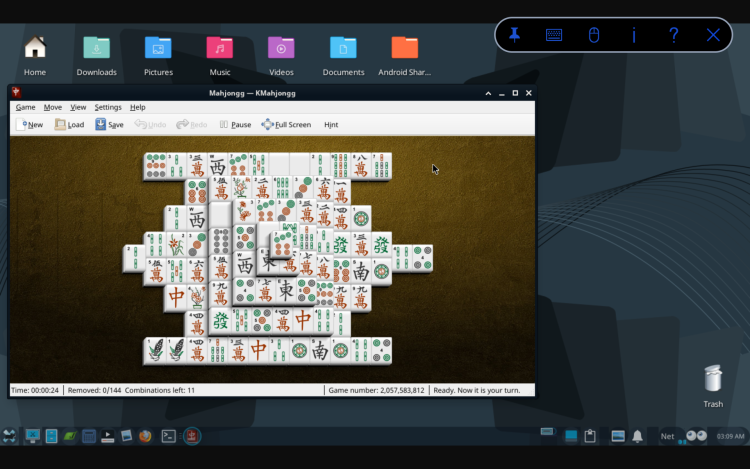
    This includes graphical games, tools and apps using a hybrid XFCE/KDE/GNOME desktop environment.
    Nearly 80% of all global Termux repositories are installed, including some outdated but useful tools, rejected tools, private tools. What isnt included is mainly redundant files. How many notepads do we really need? Or, alternative features that would conflict, such as other desktop features.

    Features a built in private and secure search engine set up in Firefox.

    GNU Make 4.3.90

    openjdk version "21.0.11" 2026-04-21
    OpenJDK Runtime Environment (build 21.0.11)
    OpenJDK 64-Bit Server VM (build 21.0.11, mixed mode) v17 and v25.
    javac 21.0.11

    Python 3.15.0rc1
    Python 3.13.16
    Python 2.7

    This is perl 5, version 42, subversion 0 (v5.42.0) built for aarch64-android

    ruby 3.4.1 (2024-12-25 revision 48d4efcb85) +PRISM [aarch64-linux-android]

    Multiple package managers.

    .--. Pacman v7.1.0 - libalpm v16.0.0
    / _.-' .-. .-. .-. Copyright (C) 2006-2025 Pacman Development Team
    \ '-. '-' '-' '-' Copyright (C) 2002-2006 Judd Vinet
    '--'

    npm
    11.17.0

    apt 3.1.15 (aarch64)

    Included is the first ever Termux App Store. Admittedly, it isn't very impressive. It is set to a private repository, about 100 apps, several of which do not install. It is a work in progress, early beta, with plans to include primary repositories.

    It has docker support and all features of my previous releases.

    MESA, Vulkan and OpenGL supported video drivers cover all Android devices.

    PulseAudio configured and supports media as shown in the video.

    This is no lightweight pick and choose setup.
    It is a 20GB partition. It is 64bit only and requires a powerful device.
    2161446.png

    2152634.png

    2152642.png


  • • App not installing/saying not compatible and you're running Android 14? Then you may need to install and use VPhoneOS on your phone by clicking here or, if have a computer, visit this page from PC and click here. This should help you. If not, read this: how to install mod apk files on Android 14 or newer.
    Before reading the installation instructions below, if you need help about how to use our website, please watch a simple video tutorial we created, about How to Download & Install apk files from sbenny.com by clicking here.

    Download the desired APK file below and tap on it to install it on your device.


    • App not installing/saying not compatible and you're running Android 14? Then you need to install VPhoneOS on your phone by clicking here or, if have a computer, visit this page from PC and click here. Also, make sure you turned off "Play Protect" from the Google Play Store app, as it prevents installing mods. This should help you. If not, read this: how to install mod apk files on Android 14 or newer.


    If you need help about how to use our website, please watch this simple video tutorial below about How to Download & Install apk files from sbenny.com.


  • Code:
    not on google play


Last edited:
Downloaded 9 times
∞ and beyond!
Staff Member
Moderator
SB Mod Squad ⭐
✔ Approved Releaser
Active User
Member for 2 years
What are the hardware requirements?
This is difficult to answer as Termux is adaptive and dependent upon Android.
My suggestion would be a device with at least 2 processors, 128GB of internal storage, an 8 inch screen, 32GB of RAM.
It may be possible to run it on lesser equipment and I welcome feedback on findings by others.
 
∞ and beyond!
Staff Member
Moderator
SB Mod Squad ⭐
✔ Approved Releaser
Active User
Member for 2 years
Using the DOCKER

The core docker is already installed.
You only need install a container and use it.
Code:
docker pull termux/termux-docker-pacman
The required container will be downloaded.
termux-docker-pacman is the bare bones Termux with pacman (the package manager, not the game) installed.
2187436.png


We can test if we truly have a docker running separate version of Termux.
This will execute fastfetch in Termux and then temporarily install fastfetch and execute it in the docker before returning to Termux.

Code:
clear && fastfetch && docker run -i --rm termux/termux-docker:latest bash -c "apt update && apt install -y fastfetch && fastfetch"
2187444.png

We have a working docker 🤩
 
∞ and beyond!
Staff Member
Moderator
SB Mod Squad ⭐
✔ Approved Releaser
Active User
Member for 2 years
I have made a working Generative, localized, A.I. based on OpenAI.
It uses Llama and GGUF containers.

2187623.png

2187624.png

2187626.jpg


I have compiled all the code and released a package that makes this very simple.
The work the guys behind GGUF have done to make special docker containers makes install a snap.

I strongly suggest a dedicated device as even small AI are resource intense.

# Locate additional AI containers.

Only use GGUF models.
2187720.png

Q4 K M container
2187627.png
Llama.CPP model
2187628.png

Copy the llama download link and paste it into Termux.
2187629.png

Add this to the end and press enter
Code:
--host 0.0.0.0 --port 8085 --image-min-tokens 1024
Below, I have provided several tested models that work for my device.
The last one pushes my device to the limit and Android often shuts it down.

Note that the default port is 8080, however as I have the search engine there I have chosen port 8085 for the AI.
Too, this works from Termux desktop or Android.

# Llama command-line options. Default is usually good.
# -t set threads. Threads should be double the cores or less.

# Select Q4_K_M models only.
# Select, USE THIS MODEL dropdown menu.
# Select llama.cpp
# Select COPY for the llama option and paste it into Termux, do not press enter yet.
# Add --host 0.0.0.0 --port 8085 --image-min-tokens 1024
# and press enter.

Code:
# Install Llama OpenAI/GGUF A.I. compiler/runner.
pip install -U diffusers transformers accelerate
pkg install llama-cpp
# The first run downloads the data and can take a while.
# Subsequent runs checks for and auto updates if available.

Code:
# Minimal text, no graphics.  Requires 2.5GB RAM.
llama serve -hf Qwen/Qwen2.5-Coder-1.5B-Instruct-GGUF:Q4_K_M --host 0.0.0.0 --port 8085 --image-min-tokens 1024
Code:
# Minimal text, minimal graphics.  Requires 8GB RAM.
llama serve -t 16 -fit on -hf unsloth/Qwen3.8-27B-GGUF:UD-Q4_K_M --host 0.0.0.0 --port 8085 --image-min-tokens 1024
Code:
# Medium full text with limited graphics.  Requires 8GB RAM.
llama serve -hf Qwen/Qwen3-VL-8B-Instruct-GGUF:Q4_K_M --host 0.0.0.0 --port 8085 --image-min-tokens 1024
Code:
# Medium full text with upscaler.  Requires 12GB RAM.
llama serve -t 16 -fit on -hf MaziyarPanahi/zephyr-7b-beta-nf4-fp16-upscaled-GGUF:Q4_K_M --host 0.0.0.0 --port 8085 --image-min-tokens 1024
Code:
# Maximum full text and graphics.  Requires 22GB RAM.
llama serve -t 16 -fit on -hf DavidAU/Qwen3.8-27B-TURBO-Fable-Cold-Fusion-735-882-Heretic-Uncensored-NEO-CODER-MAX-MTP-GGUF:Q4_K_M --host 0.0.0.0 --port 8085 --image-min-tokens 1024
 
Last edited:
∞ and beyond!
Staff Member
Moderator
SB Mod Squad ⭐
✔ Approved Releaser
Active User
Member for 2 years
A word on Termux and JAR files.
JAR are JAVA archives, zip files with addition code for JAVA to launch the content.
You may read more here

Termux has always been pissy about running JAVA in general, something I have learned to overcome in my past few releases. JAR files though have remained an issue. Why does this jar work while that one crashes java?
I have finally found a pattern that can help.

Firstly, Termux does not support the now popular GDX graphics and controller library often used in games. If the jar requires use of GDX java will crash, often reporting missing bad logic libraries.

Secondly, versions aside, which Termux now supports JAVA 1.7 up to 25, there exists multiple versions of jar, much in the way numerous versions of ZIP exist.
For example, RAR's zip tool can handle PeaZip's archives, however, PeaZip often fails to open RAR zipped archives.

Termux handles Oracle based jar archives.
The problem is the flood of jar files created from Debian .deb archives.

Within an Oracle made jar, the manifest shows
2192062.png

However, a .deb package converted to .jar shows
2192066.png

Or, in some cases there is no indication of the archiver and java gives up.

Sadly, the fix is not as simple as changing the manifest.
The way the archive is structured also differs.
As of now, Debian .jar and empty .jar will fail.

Unfortunately, there is no way of knowing what archiver created the .jar file until you download and examine the meta-info folders manifest.

Further, many old .jar files exist that should be .jme
2192069.png

The JAVA Micro Edition was made for very low end flip phones.
At one time in the past there was a Termux repository to add a custom package to support jme archives, but it has long vanished.
The J2ME emulator to run these old archives exists for many platforms, including Android, but not natively in Termux.

Keeping all that in mind, I can refine searches to Oracle jar files.
I now have a graphical Roguelike working.
2192124.png
 
Last edited:
∞ and beyond!
Staff Member
Moderator
SB Mod Squad ⭐
✔ Approved Releaser
Active User
Member for 2 years
2193850.jpg

Hermes Agent is an open-source artificial intelligence agent developed by Nous Research. It is designed to perform autonomous and multi-step tasks using large language models. Hermes Agent can be configured to use both locally hosted and remotely hosted LLMs.

For anyone wondering, yes, Termux can handle running this AI.
2193843.png

2193844.png

2193845.png


From within the desktop.
2193852.png
 
Last edited:
Lurker Lv0️⃣
Member for 8 years
Works great even on my older Android device!!
 
∞ and beyond!
Staff Member
Moderator
SB Mod Squad ⭐
✔ Approved Releaser
Active User
Member for 2 years
New Roguelike game.
 
∞ and beyond!
Staff Member
Moderator
SB Mod Squad ⭐
✔ Approved Releaser
Active User
Member for 2 years
Activating Shizuku for use within Termux.

Download the attached zipped file, Shikuzu.zip
Extract the 3 files into the Android/Download folder.
This process assumes Shizuku is installed on Android and running.

From within Termux.
Code:
cp /sdcard/Download/rish* $PREFIX/bin/
cp /sdcard/Download/shizuku.sh ~/.scripts/

chmod +x ~/.scripts/shizuku.sh
chmod +x $PREFIX/bin/rish
chmod 400 $PREFIX/bin/rish_shizuku.dex

export RISH_APPLICATION_ID=com.termux
Now, to activate Shizuku
Code:
~/.scripts/shizuku.sh
2442241.png


Termux will now have as much root access as Shizuku can provide.

You may remove the zipped folder and 3 extracted files from Download.
 

Attachments

🤖☠ Termux Plus 5.2 Desktop was released by Snailsoft and 273 people like you already found this fantastic release! Find this and over 20,000 unique Android Games & Apps like this at sbenny.com, here since 2014 to serve the best Gaming Community in the world with hundreds new, safe and amazing releases every day.

You might also like:

Top